EducationSoftwareStrategy.com
StrategyCommunity

Knowledge Base

Product

Community

Knowledge Base

TopicsBrowse ArticlesDeveloper Zone

Product

Download SoftwareProduct DocumentationSecurity Hub

Education

Tutorial VideosSolution GalleryEducation courses

Community

GuidelinesGrandmastersEvents
x_social-icon_white.svglinkedin_social-icon_white.svg
Strategy logoCommunity

© Strategy Inc. All Rights Reserved.

LegalTerms of UsePrivacy Policy
  1. Home
  2. Topics

KB216538: Attribute ID and DESC of a default prompt answer are displayed as blank in MicroStrategy Office


Community Admin

• Strategy


This Knowledge Base article describes a known issue that has been classified as a defect by MicroStrategy. The impact is limited to MicroStrategy office. A possible workaround is to select the default prompt answer from MicroStrategy Developer. A solution/code fix for this issue is available starting in version 10.9 and 10.4 HF5.

SYMPTOM:
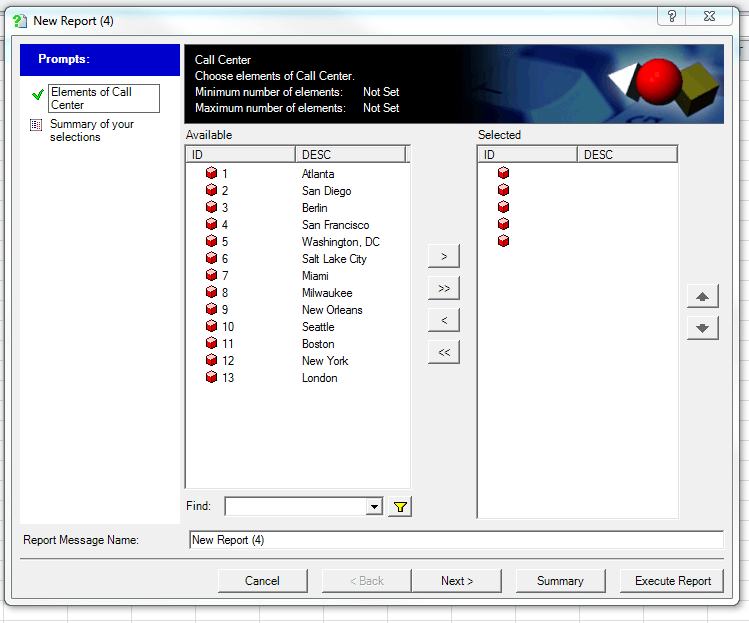
If user selects the Default prompt answer from Strategy Web 9.4.x-10.x and runs the report from Strategy Office, the selected prompt answers will be displayed as blank.
 

ka04W000000ObHNQA0_0EM4400000025sY.jpeg

STEPS TO REPRODUCE
Follow the steps below in the Strategy Tutorial project :
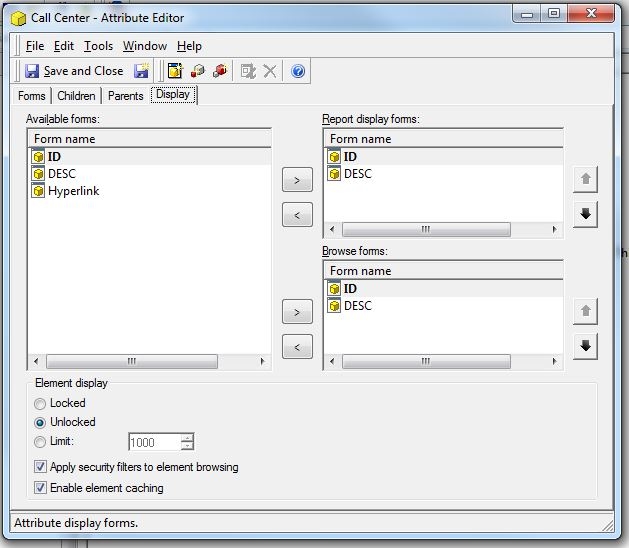
  • Edit the Call Center attribute in a way that displays ID form before the DESC form in both display and Browse forms.
ka04W000000ObHNQA0_0EM4400000025sW.jpeg
  • Save and close the attribute editor.
  • Create an Attribute element list filter with a prompt for Call Center.
  • Create a simple report with Call center and the created filter.
  • Run the report from web and select a prompt answer and save and close the report.
  • Open Strategy Office and run the same report.  Observe that the ID and DESC of the selected prompt answers are displayed as blank.

 
ACTION:
This issue has been addressed in Strategy 10.9 and 10.5 HF5. Upgrade to either of those versions to take advantage of this fix.
 
WORKAROUND: 
A possible workaround is to select the default prompt answer from Strategy Developer. To avoid the mentioned issue, follow the provided steps for the same report in Strategy Developer :
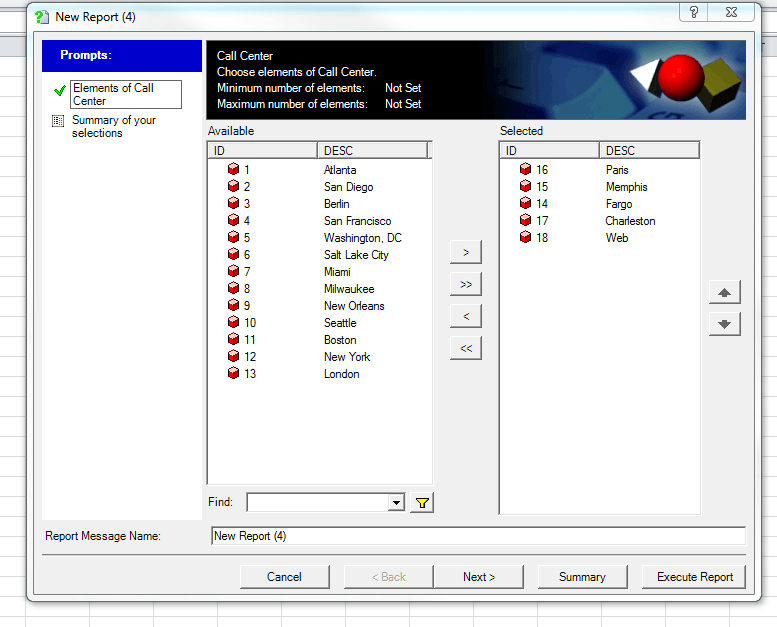
  1. Run the report and remove all the selected prompt answers.
  2. Reselect the prompt answers and then save and close the report once it has run.
  3. Run the report from Strategy Office and observe that the attribute ID and DESC of the selected prompt answers are displayed correctly.
ka04W000000ObHNQA0_0EM4400000025sj.jpeg

Note : This issue only exists in the case when attribute's ID displays before Attribute's DESC in the attribute definition.
Article Reference Number:  KB216538


Comment

0 comments

Details

Knowledge Article

Published:

June 7, 2017

Last Updated:

March 28, 2019