EducationSoftwareStrategy.com
StrategyCommunity

Knowledge Base

Product

Community

Knowledge Base

TopicsBrowse ArticlesDeveloper Zone

Product

Download SoftwareProduct DocumentationSecurity Hub

Education

Tutorial VideosSolution GalleryEducation courses

Community

GuidelinesGrandmastersEvents
x_social-icon_white.svglinkedin_social-icon_white.svg
Strategy logoCommunity

© Strategy Inc. All Rights Reserved.

LegalTerms of UsePrivacy Policy
  1. Home
  2. Topics

KB217544:The images cannot be displayed in the threshold in MicroStrategy Web Universal 9.4.1 using Firefox


Community Admin

• Strategy


The images cannot be displayed in the threshold in MicroStrategy Web Universal 9.4.1 using Firefox

SYMPTOM: 
The images cannot be displayed in the threshold in Strategy Web Universal 9.4.1 using Firefox.
 
STEPS TO REPRODUCE:
  • In Strategy Web, create a report with an attribute Category and a metric Cost.
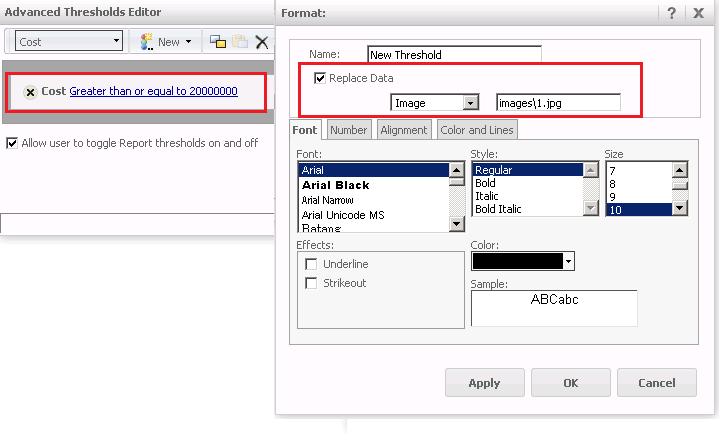
  • Right click the column header Cost and open Andvanced Threshold Editor, add a threshold filtered on Cost with the condition "Greater than or equal to 20000000".  Set the format to "Replace Data" with "Image" and specify an image "images\1.jpg", as shown below:
ka04W000000OhBgQAK_0EM440000002NS7.png
  • Run the report, note that the threshold image cannot be displayed, as shown below:
ka04W000000OhBgQAK_0EM440000002NSC.png

 
CAUSE: 
This is a known issue with Strategy Web 9.4.1.
 
ACTION: 
This issue has been fixed in 9.4.1 Hotfix 5. Please upgrade to take advantage of the fix.


Comment

0 comments

Details

Knowledge Article

Published:

June 1, 2017

Last Updated:

June 1, 2017