EducationSoftwareStrategy.com
StrategyCommunity

Knowledge Base

Product

Community

Knowledge Base

TopicsBrowse ArticlesDeveloper Zone

Product

Download SoftwareProduct DocumentationSecurity Hub

Education

Tutorial VideosSolution GalleryEducation courses

Community

GuidelinesGrandmastersEvents
x_social-icon_white.svglinkedin_social-icon_white.svg
Strategy logoCommunity

© Strategy Inc. All Rights Reserved.

LegalTerms of UsePrivacy Policy
  1. Home
  2. Topics

KB217699: <mr> tag with random data returned when executing a scp script from command line in MicroStrategy Command Manager 9.4.1


Community Admin

• Strategy


<mr> tag with random data returned when executing a scp script from command line in MicroStrategy Command Manager 9.4.1

SYMPTOM
When executing an scp script from command line in Strategy Command Manager 9.4.1 with the following command:


LIST ALL INTELLIGENT CUBE CACHES FOR PROJECT "Strategy Tutorial"

 
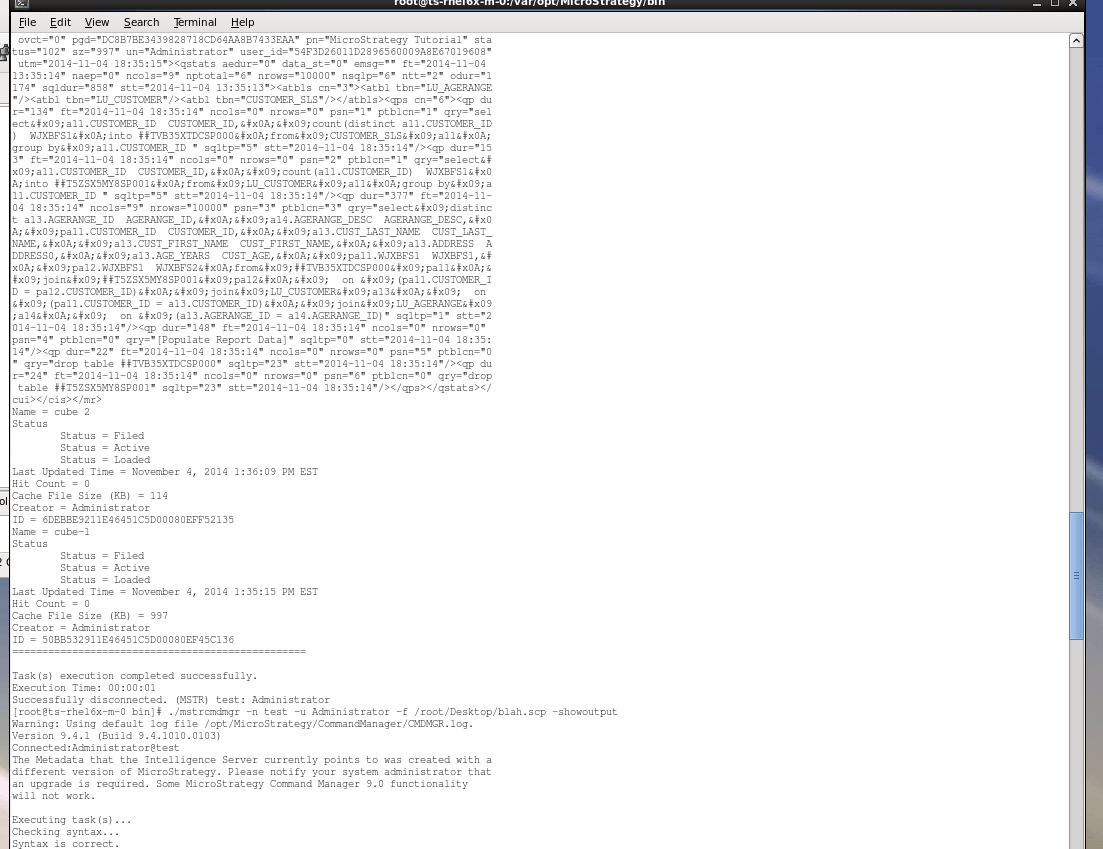
 a <mr>[...]</mr> tag is returned with random data along with the expected results.
 
STEPS TO REPRODUCE
All steps were all performed on a Linux machine with the Intelligence Server configured to the Strategy Tutorial Metadata
1. Create a scp file on the machine and type the following script in that file : LIST ALL INTELLIGENT CUBE CACHES FOR PROJECT "Strategy Tutorial";
2. Open the terminal and execute the following script:

./mstrcmdmgr -n <project source name> -u <user name> -p <password> -f <path to scp file and scp file name>.scp -showoutputp

An example with the project source test, Administrator wih password pass, and file name blah in the desktop folder would look like this:

./mstrcmdmgr -n test -u Administrator -p pass -f /root/Desktop/blah.scp -showoutputp

For details on the parameters for Command Manager in the command line see the Installation and Configuration Guide, section "Configuring Strategy Using Command Line Tools”
3. Observe that a big "mr tag" will be displayed first and then the result will be displayed.

ka04W000000OgpyQAC_0EM440000002CA5.jpeg
ka04W000000OgpyQAC_0EM440000002CAB.jpeg

 
CAUSE
This is a known issue in Strategy Command Manager 9.4.1.
 
ACTION
Contact Strategy Technical Support for an update on this issue.
 
The Strategy Internal Reference Number for the issue discussed in this technical note is 986800.


Comment

0 comments

Details

Knowledge Article

Published:

June 8, 2017

Last Updated:

June 8, 2017