EducationSoftwareStrategy.com
StrategyCommunity

Knowledge Base

Product

Community

Knowledge Base

TopicsBrowse ArticlesDeveloper Zone

Product

Download SoftwareProduct DocumentationSecurity Hub

Education

Tutorial VideosSolution GalleryEducation courses

Community

GuidelinesGrandmastersEvents
x_social-icon_white.svglinkedin_social-icon_white.svg
Strategy logoCommunity

© Strategy Inc. All Rights Reserved.

LegalTerms of UsePrivacy Policy
  1. Home
  2. Topics

KB217832: How to combine attribute elements in a selector in MicroStrategy 9.x?


Community Admin

• Strategy


How to combine attribute elements in a selector in MicroStrategy 9.x?

SUMMARY
This tech note describes how to combine attribute elements in a selector such as a drop down selector in Strategy Web 9.x. This will allow a user to choose multiple attribute elements in a single selection.
 
ACTION
1. In Strategy Desktop, create a new Custom Group.
2. Create a Custom Group element defined as Region in list Northeast,Northwest.
3. Create a second Custom Group element defined as Region in list Southeast, Southwest.

ka04W000001IvaMQAS_0EM4400000025iX.jpeg

 
4. Create a report with the Custom Group, the Region attribute and the Profit metric

ka04W000001IvaMQAS_0EM4400000025ig.jpeg

 
5. In Strategy Web, create a new document with the report as a dataset.
6. Add a grid to the document with the Region attribute and Profit metric.
7. Insert a Drop-down selector

ka04W000001IvaMQAS_0EM4400000025ic.jpeg

 
8. Right Click the selector and choose Properties and Formatting.
9. In the Properties and Formatting window, choose Properties > Selector. Set the Action Type to "Choose Attribute Element", set the Custom Group as the Source, and set the Grid as the target for the selector.

ka04W000001IvaMQAS_0EM4400000025ii.jpeg

 
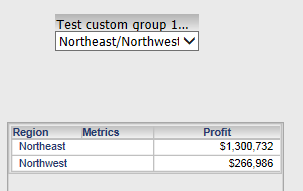
10. Execute the document. The selector will allow you to choose a Custom Group element and the Grid will display each region in the Custom Group element.
ka04W000001IvaMQAS_0EM4400000025iU.jpeg

 
TO LEARN MORE
KB46734: In Strategy Web 9.4.1, custom group selector does not have the custom group elements, while in 9.3.1 the selector has elements listed.
KB46425: Attribute element selectors will display elements even if there is no data for those elements, in Strategy Web 9.4.1


Comment

0 comments

Details

Knowledge Article

Published:

June 12, 2017

Last Updated:

June 12, 2017