SUMMARY:
This document shows one issue that catalog name display in the error message is truncated when attempting to run a MDX report against native XMLA provider and Essbase 11.x data source with empty catalog name in database instance. The resolution is to enter correct catalog name in database instance.
SYMPTOM:
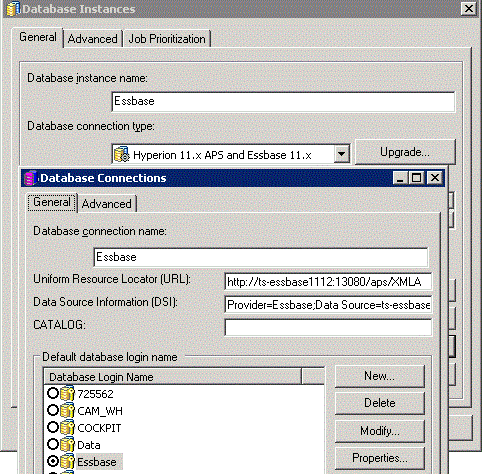
When attempting to run a MDX report against Essbase 11.x data source with empty catalog name in database instance in Strategy Developer 9.4.1, error message below would pop up:
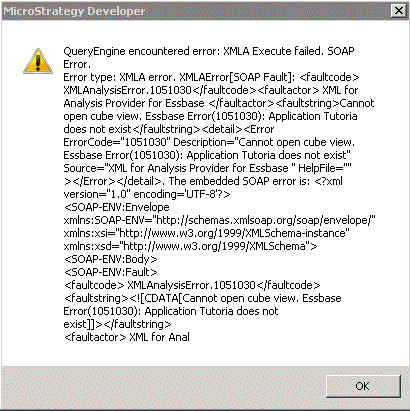
The DSSErrors.log contains entry as below:
2014-11-30 22:18:18.217-08:00 [HOST:TJIANG941][PID:5564][THR:5788][Query Engine][Error][0x80042300] QueryEngine encountered error: XMLA Execute failed. SOAP Error.
Error type: XMLA error. XMLAError[SOAP Fault]: <faultcode> XMLAnalysisError.1051030</faultcode><faultactor> XML for Analysis Provider for Essbase </faultactor><faultstring>Cannot open cube view. Essbase Error(1051030): Application Tutoria does not exist</faultstring><detail><Error ErrorCode="1051030" Description="Cannot open cube view. Essbase Error(1051030): Application Tutoria does not exist" Source="XML for Analysis Provider for Essbase " HelpFile="" ></Error></detail>. The embedded SOAP error is: <?xml version="1.0" encoding='UTF-8'?>
<SOAP-ENV:Envelope xmlns:SOAP-ENV="http://schemas.xmlsoap.org/soap/envelope/" xmlns:xsi="http://www.w3.org/1999/XMLSchema-instance" xmlns:xsd="http://www.w3.org/1999/XMLSchema">
<SOAP-ENV:Body>
<SOAP-ENV:Fault>
<faultcode> XMLAnalysisError.1051030</faultcode>
<faultstring><![CDATA[Cannot open cube view. Essbase Error(1051030): Application Tutoria does not exist]]></faultstring>
<faultactor> XML for Analysis Provider for Essbase </faultactor>
<detail>
<Error ErrorCode= "1051030"
Description = "Cannot open cube view. Essbase Error(1051030): Application Tutoria does not exist"
Source = "XML for Analysis Provider for Essbase "
HelpFile=""
/>
</detail>
</SOAP-ENV:Fault>
</SOAP-ENV:Body>
</SOAP-ENV:Envelope>
CAUSE:
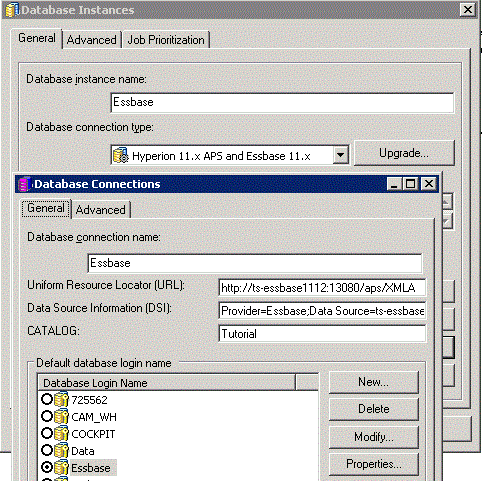
Catalog name should not be empty in database instance.
ACTION:
Enter correct catalog name in database instance.
The Strategy Internal Reference Number for the issue discussed in this technical note is 999240.
KB218014
