EducationSoftwareStrategy.com
StrategyCommunity

Knowledge Base

Product

Community

Knowledge Base

TopicsBrowse ArticlesDeveloper Zone

Product

Download SoftwareProduct DocumentationSecurity Hub

Education

Tutorial VideosSolution GalleryEducation courses

Community

GuidelinesGrandmastersEvents
x_social-icon_white.svglinkedin_social-icon_white.svg
Strategy logoCommunity

© Strategy Inc. All Rights Reserved.

LegalTerms of UsePrivacy Policy
  1. Home
  2. Topics

KB218335: "Error(s) occurred while loading report: DSSSQLEngine: Schema loading error: Template (). -Template Unit-Template Attribute- XX base form not found..." error occurs when browsing attribute elements in a report filter.


Community Admin

• Strategy


This article describes an error that can occur when trying to build a report filter in MicroStrategy.

SUMMARY:
This error occurs in Strategy Developer when browsing elements on an attribute in a report filter. One possible cause for this issue is a corrupt object cache which can be resolved by purging object caches at the project level.
 
SYMPTOM:
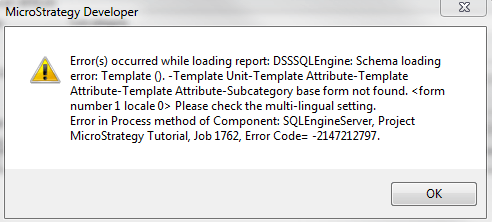
In Strategy, the following error message can display when browsing elements on an attribute in a report filter:
 

ka04W000000OhpLQAS_0EM440000002CD0.jpeg


Error(s) occurred while loading report: DSSSQLEngine: Schema loading error: Template (). –Template Unit- Template Attribute- Template Attribute- Template Attribute- XX base form not found. <form number 1 locale 0> Please check the multi-lingual setting. Error in Process method of Component: SQLEngineServer, Project XX, Job XX, Error Code= -2147212797.
 
CAUSE:
This error indicates one of two things. Option one is that the schema is in an inconsistent state and needs to be updated. Option two is that there is a corrupted object cache which does not match the objects in the metadata.
  
ACTION:
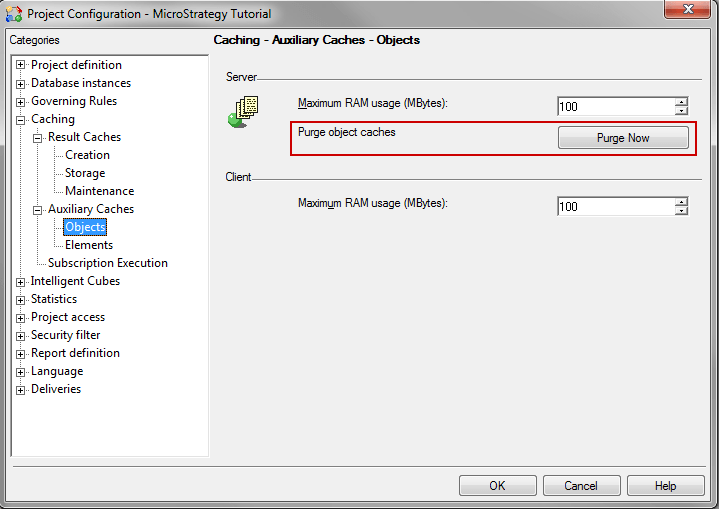
Update the schema. If that does not work then purge the object caches for the project in Developer under Project Configuration > Caching > Auxiliary Caches > Objects > Purge Now, like shown below:

ka04W000000OhpLQAS_0EM440000002CCw.jpeg


Comment

0 comments

Details

Knowledge Article

Published:

April 11, 2017

Last Updated:

April 11, 2017