EducationSoftwareStrategy.com
StrategyCommunity

Knowledge Base

Product

Community

Knowledge Base

TopicsBrowse ArticlesDeveloper Zone

Product

Download SoftwareProduct DocumentationSecurity Hub

Education

Tutorial VideosSolution GalleryEducation courses

Community

GuidelinesGrandmastersEvents
x_social-icon_white.svglinkedin_social-icon_white.svg
Strategy logoCommunity

© Strategy Inc. All Rights Reserved.

LegalTerms of UsePrivacy Policy
  1. Home
  2. Topics

KB218536: Grid cells remain highlighted after closing an information window in MicroStrategy Mobile 9.4.1 iOS Update 4


Community Admin

• Strategy


When using an information window that is targeted by a grid element in MicroStrategy Mobile 9.4.1, the cell is highlighted. However after closing the information window, the cell remains highlighted.

SYMPTOM:
When a grid targets an information, tapping on a grid cell to trigger the info window will highlight the cell as shown below:
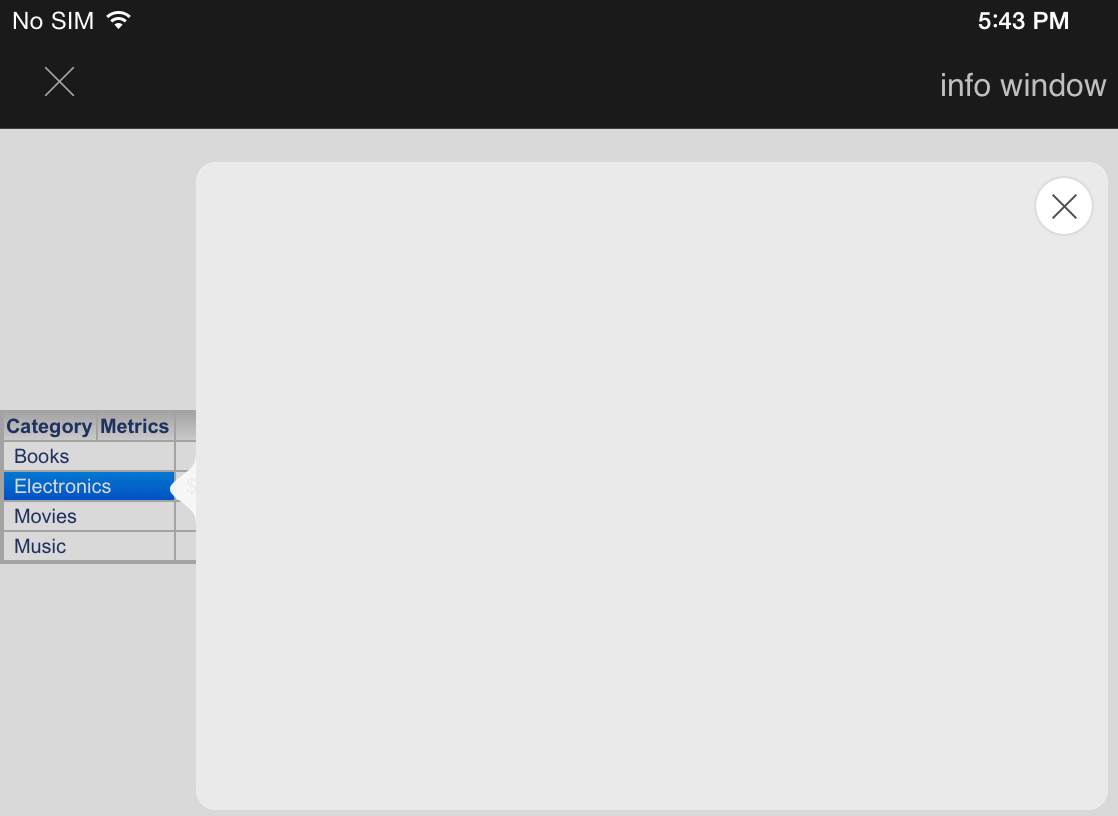
ka04W000001MKoxQAG_0EM440000002A1X.jpeg

 
However, in Strategy Mobile 9.4.1 iOS Update 4, the grid cell will remain highlighted even after the information window has been closed as shown below: 
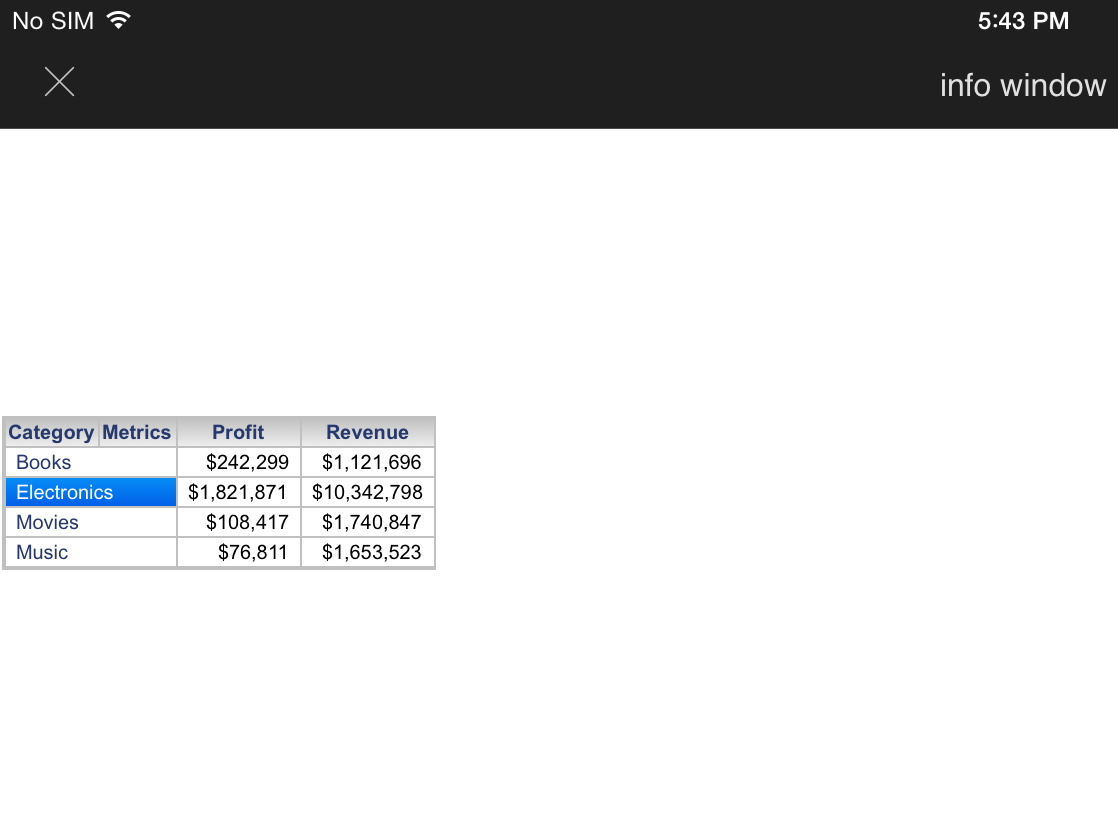
ka04W000001MKoxQAG_0EM440000002A1V.jpeg

 
STEPS TO REPRODUCE:

  • In Strategy Tutorial Project, create a new document.
  • Add Category Sales report as a dataset.
  • Add a grid to the document that contains Category in the rows and Profit and Revenue in the columns.
  • Add a panel stack to the document.
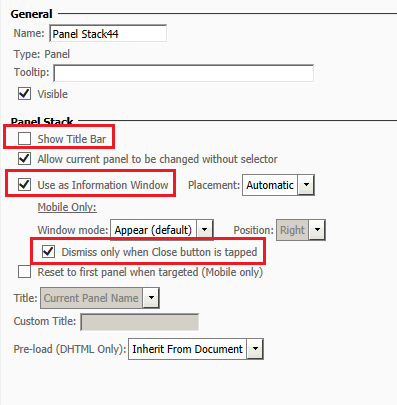
  • In the panel stack properties, check the box "Use as Information Window" and "Dismiss only when closed" 
  • Uncheck the box "Show Title Bar". These 3 settings are shown in the screenshot below.
ka04W000001MKoxQAG_0EM440000002A1Y.jpeg
  • Right-click on the Category attribute on the grid and choose "Select Target"
  • Click the Panel Stack to select it as a target, then click the green checkbox to save the selection.
  • Save the document and open it in the Strategy Mobile 9.4.1 iOS Update 4 iPad app.
  • Click on the Category attribute elements to trigger the information window, then close the information window.
  • Notice that the grid cell remains highlighted.

 
CAUSE:
This is a known issue with Strategy Mobile 9.4.1 iOS Update 4.
 
ACTION:
This issue has been addressed in Strategy Mobile 10.0 . Upgrade to this version or later to take advantage of this fix.
 
WORKAROUND:
Enable the "Show Title" property. The issue does not occur when the title bar is present. If a title is not desired, change the title to a Custom Title and then leave the title blank as shown below:
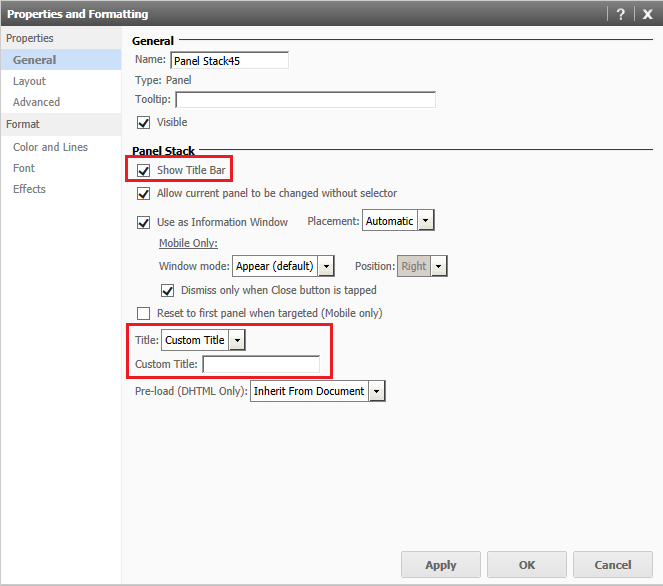
ka04W000001MKoxQAG_0EM440000002A1T.jpeg

 
Alternatively, do not use the "Dismiss only when Closed" feature.
 
The Strategy Internal Reference Number for the issue discussed in this technical note is 989468.


Comment

0 comments

Details

Knowledge Article

Published:

April 6, 2017

Last Updated:

April 6, 2017