EducationSoftwareStrategy.com
StrategyCommunity

Knowledge Base

Product

Community

Knowledge Base

TopicsBrowse ArticlesDeveloper Zone

Product

Download SoftwareProduct DocumentationSecurity Hub

Education

Tutorial VideosSolution GalleryEducation courses

Community

GuidelinesGrandmastersEvents
x_social-icon_white.svglinkedin_social-icon_white.svg
Strategy logoCommunity

© Strategy Inc. All Rights Reserved.

LegalTerms of UsePrivacy Policy
  1. Home
  2. Topics

KB218550: Dynamic text with derived metrics sourcing from different datasets could not calculate correct result in Report Services Document in MicroStrategy Web


Community Admin

• Strategy


This document shows one known issue in which dynamic text with derived metrics sourcing from different datasets could not calculate correct result in Report Services Document in MicroStrategy Web 9.4.1. This issue has been addressed in MicroStrategy 9.4.1 Hotfix 7.

SUMMARY:
This document shows one known issue in which dynamic text with derived metrics sourcing from different datasets could not calculate correct result in Report Services Document in Strategy Web 9.4.1. This issue has been addressed in Strategy 9.4.1 Hotfix 7. 
 
SYMPTOM:  
Dynamic text with derived metrics sourcing from different datasets could not calculate correct result in report services document in Strategy Web 9.4.1. It displays static text.
 
STEPS TO REPRODUCE:
  • Create a report R1 with metric Revenue.
  • Create a report R2 with metric Cost.
  • Create a document with R1 and R2 as datasets.
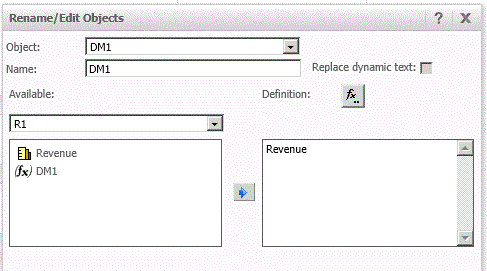
  • In document editor, insert derived metric DM1=Revenue as shown below:
ka04W000000Of8tQAC_0EM4400000025rz.jpeg
  • Insert derived metric DM2=Cost as shown below:
ka04W000000Of8tQAC_0EM4400000025s1.jpeg
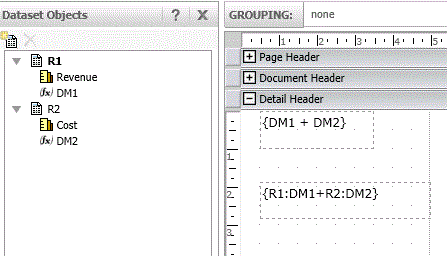
  • Insert dynamic text with formula {DM1+DM2}. Insert another dynamic text with formula {R1:DM1+R2:DM2} as shown below:
ka04W000000Of8tQAC_0EM4400000025rx.jpeg
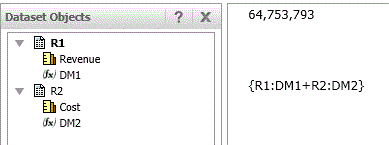
  • Run the document. Text with formula {DM1+DM2} works fine but text with formula {R1:DM1+R2:DM2} shows static text as below:
ka04W000000Of8tQAC_0EM4400000025s6.jpeg

 
CAUSE:
This is a known issue in Strategy Web 9.4.1
 
ACTION:
This issue has been addressed in Strategy 9.4.1 Hotfix 7. Upgrade to this version to take advantage of the fix.


Comment

0 comments

Details

Knowledge Article

Published:

June 2, 2017

Last Updated:

June 2, 2017