EducationSoftwareStrategy.com
StrategyCommunity

Knowledge Base

Product

Community

Knowledge Base

TopicsBrowse ArticlesDeveloper Zone

Product

Download SoftwareProduct DocumentationSecurity Hub

Education

Tutorial VideosSolution GalleryEducation courses

Community

GuidelinesGrandmastersEvents
x_social-icon_white.svglinkedin_social-icon_white.svg
Strategy logoCommunity

© Strategy Inc. All Rights Reserved.

LegalTerms of UsePrivacy Policy
  1. Home
  2. Topics

KB218708: After upgrading to MicroStrategy 9.4.1, after exporting a document to MHT file, it gets exported to PDF file instead. Before the upgrade documents were exported to MHT files by default.


Community Admin

• Strategy


SUMMARY:
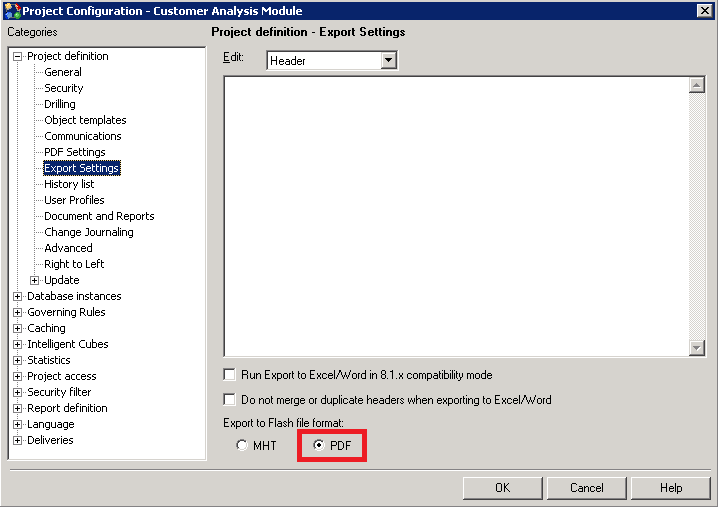
This is not a defect. The default setting for “Export to Flash file format” has been changed in 9.4.0. The impact is limited to Strategy Web 9.4.x product only. There is a workaround available in this technote.
 
SYMPTOM:
After upgrading to Strategy 9.4.1, a user notices a different behavior. Instead of exporting to MHT file as expected, the document gets exported to PDF.
      
STEPS TO REPRODUCE:

  1. Install or currently have Strategy Developer(Desktop) 9.3.1*
  2. In Desktop, open a Project Configuration. Under Export Settings,  MHT file is selected as a default file format.
ka04W000000OfwVQAS_0EM4400000025rK.jpeg

     * Instead of installing Strategy 9.3.1, a user can open the Project Configuration of any project directly if the user knows that the setting has never been changed before.
  1. Install / upgrade Strategy to 9.4.1 version
  2. In Strategy Developer, open Project Configuration/Export Settings.
  3. Notice that “Export to Flash file format” setting is set now to PDF:
ka04W000000OfwVQAS_0EM4400000025rO.jpeg


CAUSE:
The default setting for “Export to Flash file format” has been changed from MHT to PDF in Strategy 9.4.1.
 
ACTION/WORKAROUND:   

  1. Select MHT file in Project Configuration/Export Setting
  2. After changing the Project Configuration > Project Definition > Export Settings > Export to Flash file format option, make sure to re-start the Web Server service connected to the given project


Comment

0 comments

Details

Knowledge Article

Published:

June 7, 2017

Last Updated:

July 17, 2017