EducationSoftwareStrategy.com
StrategyCommunity

Knowledge Base

Product

Community

Knowledge Base

TopicsBrowse ArticlesDeveloper Zone

Product

Download SoftwareProduct DocumentationSecurity Hub

Education

Tutorial VideosSolution GalleryEducation courses

Community

GuidelinesGrandmastersEvents
x_social-icon_white.svglinkedin_social-icon_white.svg
Strategy logoCommunity

© Strategy Inc. All Rights Reserved.

LegalTerms of UsePrivacy Policy
  1. Home
  2. Topics

KB218763: Tooltip and use as selector does not work correctly in Gantt graph in MicroStrategy Web 9.4.x


Community Admin

• Strategy


In MicroStrategy Web 9.4.x, insert a Gantt graph in a Report Service document, and use graph as selector, when mouse over any Gantt bar, the tooltip and use as selector function does not work.

SYMPTOM:
In Strategy Web 9.4.x, insert a Gantt graph in a Report Service document, and use graph as selector, when mouse over any Gantt bar, the tooltip and use as selector function does not work.
 
STEPS TO REPRODUCE:
Follow below steps to reproduce with Strategy Tutorial project:

  • In Strategy web 9.4.x, browse to Tutorial project>Shared Reports>Strategy Platform Capabilities>Graph Styles, create a Report Service document with report "Gantt Chart - Project Tasks".
  • In the Report Service document, insert another grid with task attribute in row. Set task attribute in Gantt graph as selector.
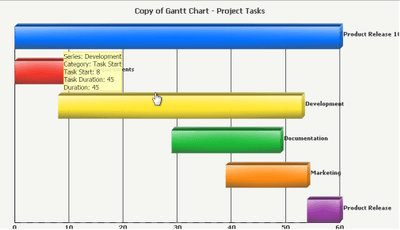
  • Run document in Interactive mode, mouse over to one of the Gantt bar, note not tooltip display for that bar and the bar is not able to be clicked as a selector, as shown below:
ka04W000000OeHVQA0_0EM4400000025q6.jpeg
  • Mouse over to the shade part of the bar, note that the tooltip and selector function only works for that part, as shown below:
ka04W000000OeHVQA0_0EM4400000025q5.jpeg
  • In Strategy Web 9.3.1, the whole bar is available for both tooltip and selector, as shown below:
ka04W000000OeHVQA0_0EM4400000025q3.jpeg

CAUSE:
This is known issue in Strategy Web 9.4.x.
 
ACTION:
This issue has been fixed in Strategy Web 9.4.1 Hotfix 7. Take advantage of upgrading for a fix.


Comment

0 comments

Details

Knowledge Article

Published:

June 12, 2017

Last Updated:

June 12, 2017