SUMMARY
This article documents an issue with Statistics logging in Strategy Intelligence Server 9.4.x where no Statistics are written to the table IS_SESSION_STATS. This issue has been classified as a defect and has been fixed in Strategy 10.
SYMPTOM
In Strategy Intelligence Server 9.4.x, it is noticed that Statistics are not written to the Statistics table IS_SESSION_STATS. The statistics configuration is verified to be setup correctly and administrators see that all the project level statistics get written correctly to tables such as IS_PROJ_SESS_STATS, IS_REPORT_STATS etc. There are no errors in the DSSErrors.log from the time of Strategy Intelligence Server startup.
After restarting the Strategy Intelligence Server, the issue goes away on a few occasions. In some cases, a restart also does not help.
Note: The statistics configuration setup at the server level under the Strategy Intelligence Server configuration is irrelevant to this issue. This is because, the server level statistics initiation is done by the Intelligence Server at startup by going through the available projects on startup and then dynamically selecting the required statistics database instance(s)
CAUSE
This issue has been classified as a defect with Strategy Intelligence Server 9.4.x.
ACTION
This issue has been fixed in Strategy Analytical Enterprise 10. Upgrade to this version to take advantage of the fix.
WORKAROUND
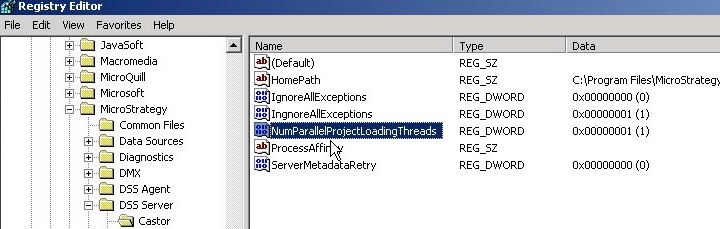
This issue is not seen if parallel project loading is disabled during Strategy Intelligence Server 9.4.x startup.
When Strategy Intelligence Server 9.4.x is next restarted after disabling parallel project loading, verify that parallel project loading has been disabled by looking for the following entry in the DSSErrors.logs. The slots listed should be 1 and parallel should be marked to false as shown below.
2014-11-17 16:59:42.139-05:00 Projects Loading Started: projects = 6, parallel = false, slots = 1
UNIX/Linux
To disable parallel project loading, implement the steps below:
"HomePath"="/home/MicroStrategy/IntelligenceServer"
"IgnoreAllExceptions"=dword:00000000
"ProcessAffinity"=""
