In Strategy Distribution Services 9.x, when a user creates or edits a subscription, a number of macros are available to substitute specific text strings such as date or time into the subject, filename, etc. of the subscription.


For the Time macro (%%Time%% or {&Time}), the default output format is HH.MM.SS. So, if the current time when the subscription is run is 3:13:37 AM, the macro output will display as "03.13.37".
QUESTION:
Is it possible in Strategy 9.x to customize the default output to display in a different format, such as HH-MM-SS, or some other custom setting?
ANSWER:
There is an existing enhancement request for the ability to customize the macro output to any setting the user desires. Strategy will continue to investigate and post updates as soon as they are available.
Currently there is only one other possible output format available, which is HH-MM. This format is available through the use of a registry setting, as described below:
If the Intelligence Server is on Windows:
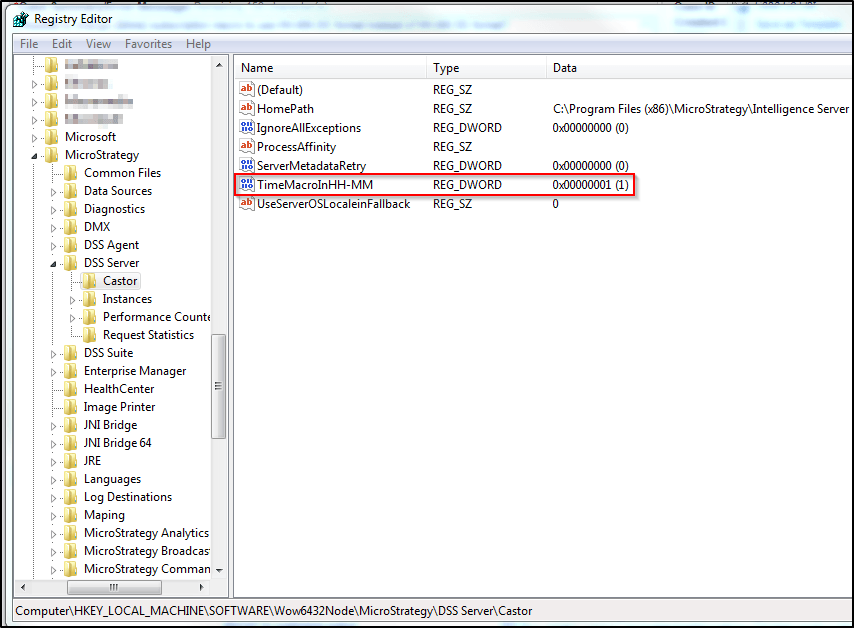
Open the Windows registry, navigate to the "HKEY_LOCAL_MACHINE\SOFTWARE\Wow6432Node\MicroStrategy\DSS Server\Castor" key, and add a new registry DWORD entry called "TimeMacroInHH-MM" with value = 1.
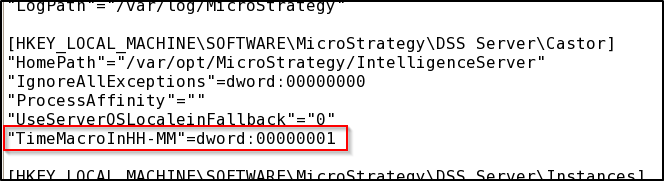
If the Intelligence Server is on Linux/UNIX, edit the MSIReg.reg file located in the Strategy home directory, navigate to the "HKEY_LOCAL_MACHINE\SOFTWARE\MicroStrategy\DSS Server\Castor" line and add the line "TimeMacroInHH-MM"=dword:00000001 at the end of the key.
On either platform, the Intelligence Server will need to be restarted after making the registry edit for the change to take effect.
The Strategy Internal Reference Number for the issue discussed in this technical note is 662347.
Registry Modification Warning:
Modifying registry values incorrectly may cause serious, system-wide problems that may require the re-installation of Microsoft Windows. Any edit of the registry is done at the user's own risk. Since these are user-initiated changes, they are not covered by any Strategy warranty. If using Microsoft Windows, the user should backup the registry and/ or update an Emergency Repair Disk prior to alterations.
