EducationSoftwareStrategy.com
StrategyCommunity

Knowledge Base

Product

Community

Knowledge Base

TopicsBrowse ArticlesDeveloper Zone

Product

Download SoftwareProduct DocumentationSecurity Hub

Education

Tutorial VideosSolution GalleryEducation courses

Community

GuidelinesGrandmastersEvents
x_social-icon_white.svglinkedin_social-icon_white.svg
Strategy logoCommunity

© Strategy Inc. All Rights Reserved.

LegalTerms of UsePrivacy Policy
  1. Home
  2. Topics

KB219376 How to confirm if Intelligence Server restart is required for configuration changes to take effect


Community Admin

• Strategy


How to confirm if Intelligence Server restart is required for configuration changes to take effect

 SCENARIO
When an Intelligence Server restart is required, a user would want to get confirmation of this through the interface, rather than through the product manuals or other means. 
Although we have a comprehensive list of settings that require restarts as shown in 
KB39685: Setting changes which require Strategy Intelligence Server 9.x to be restarted
There is no indication of which options will require a restart through the interface. For
example: User Affinity Cluster, Subscription load balancing
 
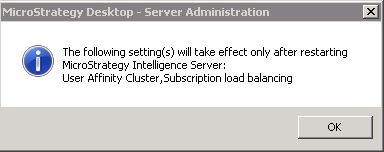
When trying to change some options at the Strategy Intelligence Server configuration level, administrators will get a pop up window as shown below: 
 

ka04W000000ObPlQAK_0EM4400000029Jd.jpeg


The following setting(s) will take effect only after restarting Strategy Intelligence Server: User Affinity Cluster, Subscription load balancing.

 
This will indicate through the interface that restarting Intelligence Server is required.
 
VIDEO:
Following video clarifies exactly when to expect the pop-up message.


Comment

0 comments

Details

Knowledge Article

Published:

June 3, 2017

Last Updated:

June 3, 2017