EducationSoftwareStrategy.com
StrategyCommunity

Knowledge Base

Product

Community

Knowledge Base

TopicsBrowse ArticlesDeveloper Zone

Product

Download SoftwareProduct DocumentationSecurity Hub

Education

Tutorial VideosSolution GalleryEducation courses

Community

GuidelinesGrandmastersEvents
x_social-icon_white.svglinkedin_social-icon_white.svg
Strategy logoCommunity

© Strategy Inc. All Rights Reserved.

LegalTerms of UsePrivacy Policy
  1. Home
  2. Topics

KB219978: The selection or highlighted style is not kept in exported files (HTML, PDF, Excel) except for Flash


Community Admin

• Strategy


The selection or highlighted style is not kept in exported files (HTML, PDF, Excel) except for Flash.

 
SUMMARY:
This document describes a feature request that is not currently available in Strategy. There is a workaround available on this document to improve usability for the end users given the current lack of this feature.
 
SYMPTOM:
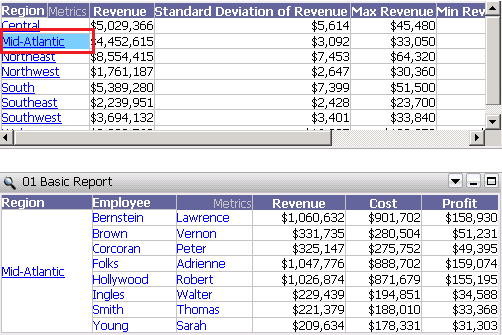
When an attribute is used from a grid as a selector and we target a subsequent grid, the user would expect to keep the Selection Style, (highlighted), after the document is exported to Excel, PDF and HTML.
ka04W00000148PSQAY_0EM4400000025oH.jpeg

 
STEPS TO REPRODUCE:

  1. Create a document or dashboard.
  2. Add two grids on it.
  3. Set an attribute as a selector to target the second grid.
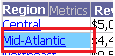
  4. When the document is seen in any mode, the selected attribute element is seen highlighted:
ka04W00000148PSQAY_0EM4400000025oC.jpeg

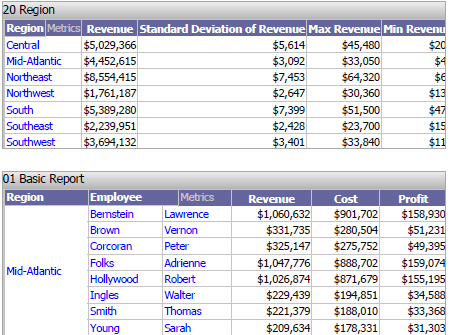
5. Now, export the document to Excel, PDF or HTML, and verify that the current selection is not exported keeping the highlighted style:
ka04W00000148PSQAY_0EM4400000025oF.jpeg

 
CAUSE:
This is working  as designed.
Currently, only export to Flash will preserve the selection style. A feature enhancement request is already being evaluated by Strategy technology team for potential future implementation.
 
WORKAROUND:
Apply the workaround provided below in order to make it easier for the end user to identify the current selection
To avoid confusion there are several possibilities:
  1. To include the required attribute on the target grid.
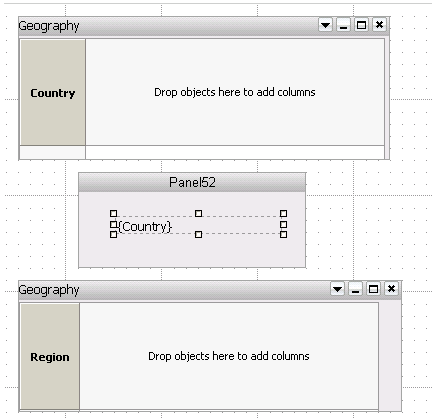
  2. Design the document as follows:
    1. Target grid included in a Panel Stack
    2. On the top, a Dynamic Text Box with the attribute, also in the same Panel Stack.
    3. The Attribute Selector targeting the Panel Stack.
ka04W00000148PSQAY_0EM4400000025o9.jpeg


Comment

0 comments

Details

Knowledge Article

Published:

May 17, 2017

Last Updated:

May 17, 2017