EducationSoftwareStrategy.com
StrategyCommunity

Knowledge Base

Product

Community

Knowledge Base

TopicsBrowse ArticlesDeveloper Zone

Product

Download SoftwareProduct DocumentationSecurity Hub

Education

Tutorial VideosSolution GalleryEducation courses

Community

GuidelinesGrandmastersEvents
x_social-icon_white.svglinkedin_social-icon_white.svg
Strategy logoCommunity

© Strategy Inc. All Rights Reserved.

LegalTerms of UsePrivacy Policy
  1. Home
  2. Topics

KB219997: The "Send notification to email address" option is grayed out in the Cache and Cube Refresh Subscription Editor


Community Admin

• Strategy


This issue has been classified as “defect” by MicroStrategy. The issue is reproducible in MicroStrategy 10.x. A workaround to this issue is providing in this document. Currently this issue being reviewed for a permanent fix in a future MicroStrategy release.

 SUMMARY
This issue has been classified as “defect” by Strategy. The issue is reproducible in Strategy 10.x. A workaround to this issue is providing in this document. Currently this issue being reviewed for a permanent fix in a future Strategy release.
 
SYMPTOM
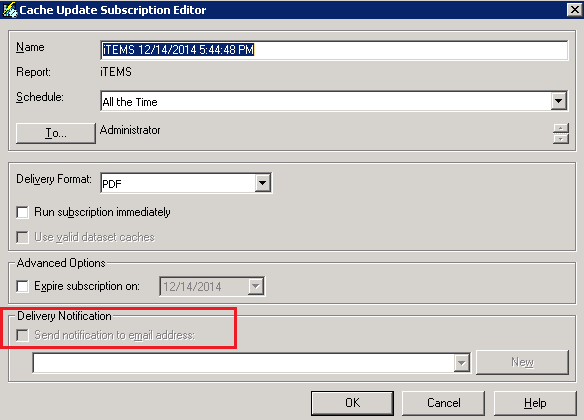
For the Cache and Cube Refresh Subscription, the “Send notification to email address” appears grayed out and there seems to be no way of enabling it unless both the History List email delivery AND Cache email delivery are both enabled.
ka04W000001482LQAQ_0EM4400000029IG.jpeg

 
STEPS TO REPRODUCE

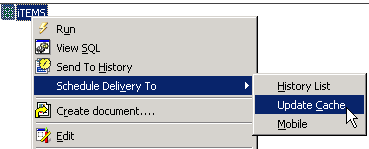
      • From Strategy Developer, right-click on a report and create a cache subscription:
ka04W000001482LQAQ_0EM4400000029I7.jpeg
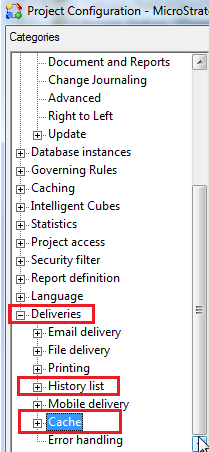
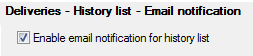
      • On the Project Configuration, Deliveries Tab, enable the Delivery Email notification both for History List and Cache.
ka04W000001482LQAQ_0EM4400000029IJ.jpeg
ka04W000001482LQAQ_0EM4400000029IK.jpeg
ka04W000001482LQAQ_0EM4400000029IE.jpeg
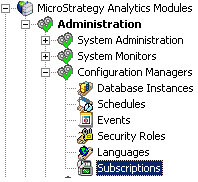
      • Go to the Project Source Administration, Configuration Managers, Subscriptions, and search for the created Cache Subscription.
ka04W000001482LQAQ_0EM4400000029IM.jpeg
      • Right click and edit it in order to check the status of the “Send notification to email address”. Verify that it can be checked / unchecked.
ka04W000001482LQAQ_0EM4400000029IQ.jpeg
      • Now, go back to the Project Configuration, Deliveries Tab, and disable the Delivery Email notification for History List.
ka04W000001482LQAQ_0EM4400000029IR.jpeg
      • By editing the Cache subscription again. it is verified that the “Send notification to email address” is grayed out and cannot be checked / unchecked.
ka04W000001482LQAQ_0EM4400000029IF.jpeg

 
CAUSE
This issue is currently clasified as a defect by Strategy. For a Cache Subscription it is only expected for the Cache – Delivery Notification to be enabled. However, the cache update and cube refresh subscriptions are being controlled by History list setting.

ka04W000001482LQAQ_0EM4400000029I9.jpeg

 
ACTION
Currently this issue is still being reviewed for feasibility by our Technology team and it is not scoped for any upcoming scheduled Strategy release.
 
WORKAROUND:
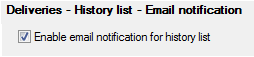
If you need to edit the checkbox for any of those subscriptions, please make sure to enable the History List email notification check box, plus the correspondent to the cache subscription.
ka04W000001482LQAQ_0EM4400000029IH.jpeg


Comment

0 comments

Details

Knowledge Article

Published:

April 11, 2017

Last Updated:

April 11, 2017