SUMMARY:
When creating reports in Enterprise Manager 9.4.1, the attribute ‘Export Indicator’ will not reference the table IS_DOC_FACT. This has been classified as a defect in Strategy Developer 9.4.1. There currently is an action to resolve this issue.
SYMPTOM:
When Administrators are trying to report on Document executions, they may find that the Attribute “Export Indicator” does not return data as desired. Upon examination of the report SQL and the Attribute, Administrators will find that the IS_DOC_FACT table is not be referenced.
STEPS TO REPRODUCE:
Step 1) Open Attribute “Export Indicator”.

Step 2) Attribute will be mapped to IS_REP_FACT only.

The table "IS_DOC_FACT" will contain Export Indicator column “IS_EXPORT_INDIC” on table.
CAUSE:
This has been classified as a defect in Strategy Enterprise Manager 9.4.1 regarding the project schema.
ACTION:
This issue can be resolved by manually adding the IS_EXPORT_INDIC column in the attribute mapping.
Steps to Resolve:
Step 1) Open Attribute “Export Indicator”.

Step 2) Modify existing Form.

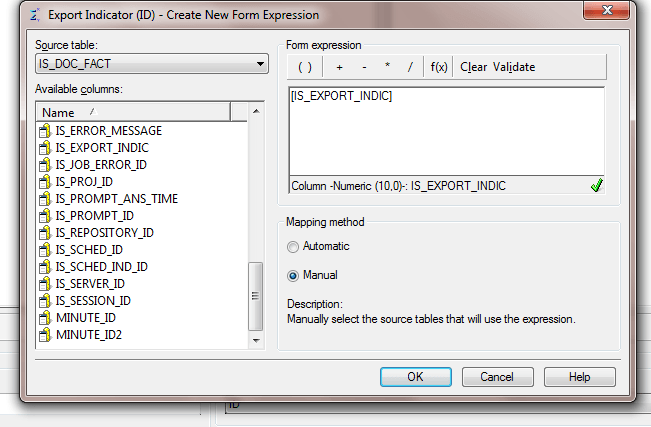
Step 3) Select to add a new form expression and select 'IS_DOC_FACT' in the available tables.

Step 4) Add the column IS_EXPORT_INDIC to the expression.
VIDEO:
You can find a detailed video on how to resolve this issue here:
