EducationSoftwareStrategy.com
StrategyCommunity

Knowledge Base

Product

Community

Knowledge Base

TopicsBrowse ArticlesDeveloper Zone

Product

Download SoftwareProduct DocumentationSecurity Hub

Education

Tutorial VideosSolution GalleryEducation courses

Community

GuidelinesGrandmastersEvents
x_social-icon_white.svglinkedin_social-icon_white.svg
Strategy logoCommunity

© Strategy Inc. All Rights Reserved.

LegalTerms of UsePrivacy Policy
  1. Home
  2. Topics

KB220151: Advanced sorting definition defined on a specific criteria element applies to different elements of the same attribute on a report in MicroStrategy Developer 9.x.


Stefan Zepeda

Salesforce Solutions Architect • Strategy


The Advanced Sorting feature is used to define a custom way in which the returned data is sorted and presented to the end user.  Within the Advanced Sorting definition, the Criteria field needs to be set in some scenarios, and shows up when an object exists above or below the metrics.  A scenario may exist where an end user can re-prompt a report, and the sorting definition appears to incorrectly sort based on its definition and the end user prompt answer.

SUMMARY
The Advanced Sorting feature is used to define a custom way in which the returned data is sorted and presented to the end user.  Within the Advanced Sorting definition, the Criteria field needs to be set in some scenarios, and shows up when an object exists above or below the metrics.  A scenario may exist where an end user can re-prompt a report, and the sorting definition appears to incorrectly sort based on its definition and the end user prompt answer.
 
DESCRIPTION
The Criteria Field:
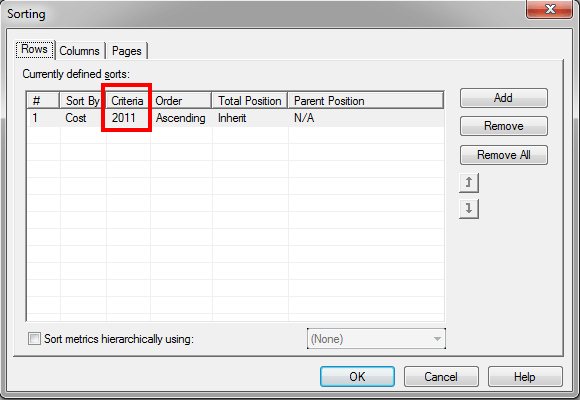
  • Defined in a sort when an object exists above or below the metrics
  • Typically, the scenario to define the Criteria is when an attribute is placed above the metrics to categorize the values
    • Can also be custom groups, consolidations, or other objects
  • Analytical Engine controls the population of the elements in the drop down for this field, and populates the possible selection options post-execution
  • Pre-execution shows the {empty criteria} option, and the previous saved selection from a prior execution and definition
    • {empty criteria} is essentially selecting an empty element, and should result in no metrics being sorted based on its selection


ka02R000000kYP7QAM_0EM440000002CBn.jpeg

 
The scenario in which an issue may be observed is if a report uses an object prompt for the report filter, and prompts the user to filter on a single element for a particular attribute.  A sort definition is created with the initial prompt answer, and after re-prompting, the data still appears to be sorted even though the sort definition contains the original element, and the report no longer uses that particular element after re-prompting.
 
STEPS TO REPRODUCE
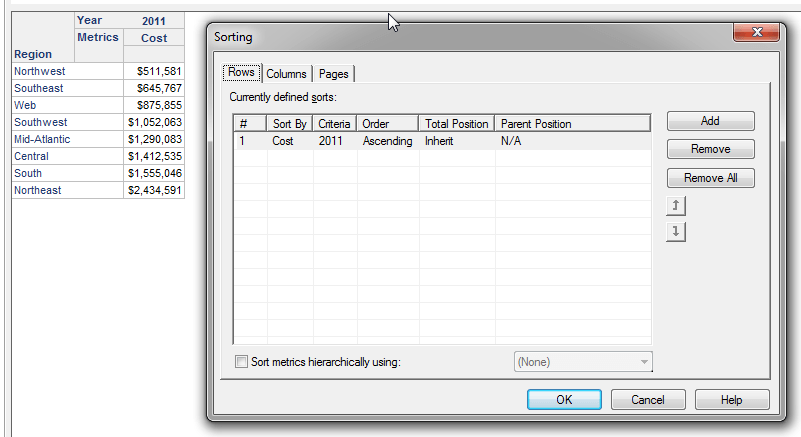
  1. Create 2 filter objects defined as Year=2011 and Year=2012
  2. Create a prompt object defined as Object prompt, and uses the 2 filters created above
  3. Create a report with Region attribute in rows, Year attribute in columns, and Cost metric in columns
  4. Execute the report, and select Year=2011 filter when prompted
  5. Navigate to Data, Advanced Sorting menu
  6. Define a sort on the Rows for the Cost metric, Criteria=2011, Ascending and hit OK
  7. Notice the values sort properly
  8. Re-prompt the report, remove Year=2011 as the selection, and select Year=2012
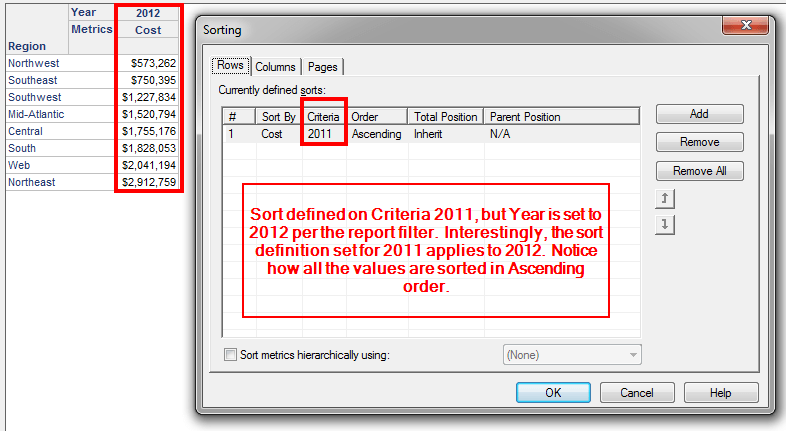
  9. Notice that the values are still sorted in Ascending order, and when reviewing the Advanced Sorting definition, it still shows as the same: Rows sorted on Cost metric, Criteria=2011, Ascending


ka02R000000kYP7QAM_0EM440000002CBj.jpeg


ka02R000000kYP7QAM_0EM440000002CBf.jpeg


ka02R000000kYP7QAM_0EM440000002CBe.jpeg


ka02R000000kYP7QAM_0EM440000002CBh.jpeg

 
This appears strange because 2011 no longer exists in the report, as it was removed when re-prompting.  The sort definition is defined on 2011, but applies to 2012.  
 
VIDEO
 
 
CAUSE
There exists conditional logic in the Analytical Engine, which is working as follows:

  1. When the attribute element in metric sort criteria is not available in the dataset, sort metric on another attribute element if there is only one element displayed on the report for that attribute.
  2. Ignore sort definition if the attribute has more than one element displayed on the report. 

This is why re-prompting from 2011 to 2012 still applies the sort – only one element exists for the same attribute whose criteria was used to define the metric sort.
 
ACTION
A few options may be considered:

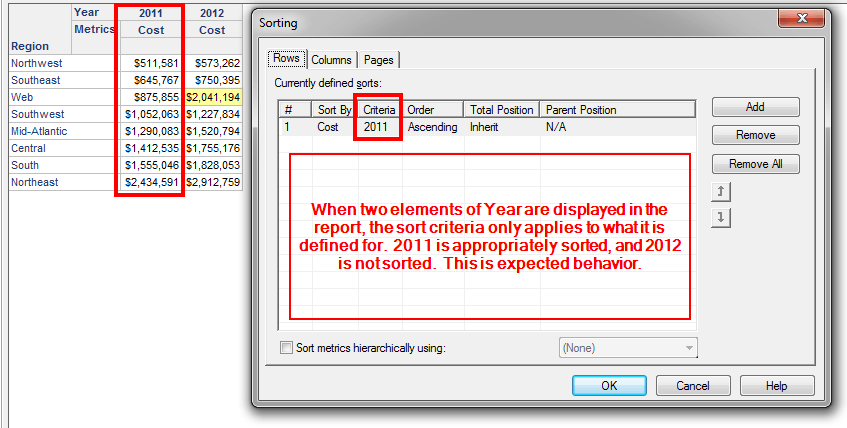
  • Display more than one element in the report grid, and sort criteria should not apply to any elements that are not as the sort is defined.
  • Remove the Criteria field from the sort definition by having no objects above or below the metrics, which results in a dynamic sort for each execution since no objects categorize the metric values
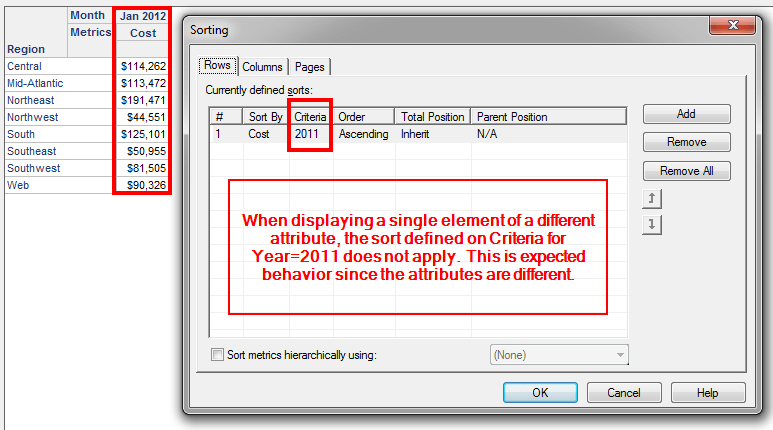
  • Prompt on more than one attribute because if the sort is defined on the Criteria for Year, but an element of Month is selected to answer the prompt, then the sort definition will not apply

These are but a few ways to address this conditional logic.
 
TO LEARN MORE
More information about Advanced Sorting can be found in the Advanced Reporting Guide product manual in Chapter 7: Designing Reports.
 
The Strategy Internal Reference Number for the issue discussed in this technical note is 992109.


Comment

0 comments

Details

Knowledge Article

Published:

June 8, 2017

Last Updated:

June 8, 2017