EducationSoftwareStrategy.com
StrategyCommunity

Knowledge Base

Product

Community

Knowledge Base

TopicsBrowse ArticlesDeveloper Zone

Product

Download SoftwareProduct DocumentationSecurity Hub

Education

Tutorial VideosSolution GalleryEducation courses

Community

GuidelinesGrandmastersEvents
x_social-icon_white.svglinkedin_social-icon_white.svg
Strategy logoCommunity

© Strategy Inc. All Rights Reserved.

LegalTerms of UsePrivacy Policy
  1. Home
  2. Topics

KB220269: 'Auto fit to contents' for grid formatting does not fully wrap the text in MicroStrategy Developer 9.4.1.


Stefan Zepeda

Salesforce Solutions Architect • Strategy


This issue is classified as a defect with MicroStrategy Technical Support. This will impact users running existing documents after the environment has been upgraded to 9.4.1. When running a dashboard in PDF/Editable mode, word wrapping on MicroStrategy 9.4.1 does not fully wrap the texts in the Grid Header of the existing document, thus truncating the text value. Grid Header Texts created in newly created document in MicroStrategy 9.4.1 does not reproduce this behavior.

SUMMARY:
This issue is classified as a defect with Strategy Technical Support. This will impact users running existing documents after the environment has been upgraded to 9.4.1. When running a dashboard in PDF/Editable mode, word wrapping on Strategy 9.4.1 does not fully wrap the texts in the Grid Header of the existing document, thus truncating the text value. Grid Header Texts created in newly created document in Strategy 9.4.1 does not reproduce this behavior.
 
SYMPTOM:
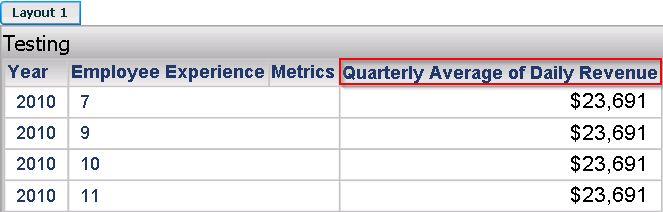
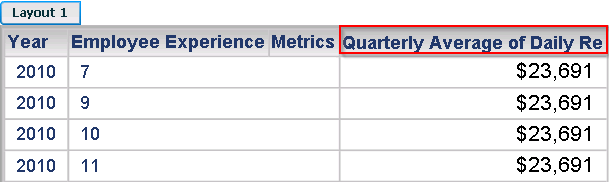
If the length of the text value is greater than the width of the grid header, 'Auto fit to content' option in Strategy 9.4.1 does not fully wrap the text and the text value is truncated as shown below:
 

ka02R000000kbkyQAA_0EM440000002CBp.jpeg

 
Strategy 9.3.1 

ka02R000000kbkyQAA_0EM440000002CBq.jpeg

 
Strategy 9.4.1
 

ka02R000000kbkyQAA_0EM440000002CBr.jpeg

 
CAUSE:
This is a known issue in Strategy Developer 9.4.1.
 
ACTION:
Currently this issue is still being reviewed for feasibility by our Technology team and it is not scoped for any upcoming scheduled Strategy release.
 
WORKAROUND:
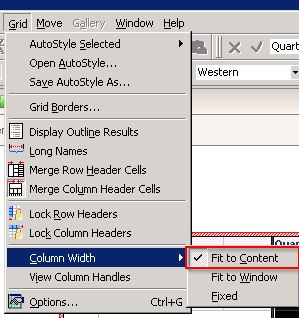
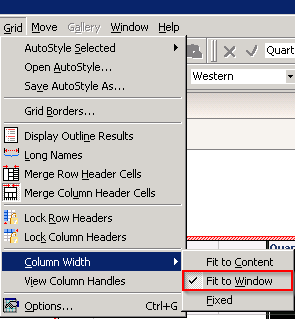
Since the issue only occurs when the formatting option is set to 'Auto fit to Content', setting the grid formatting option to 'Auto fit to Window' will display the full text value as shown below.
 

ka02R000000kbkyQAA_0EM440000002CBo.jpeg


The Strategy Internal Reference Number for the issue discussed in this technical note is 861348.


Comment

0 comments

Details

Knowledge Article

Published:

June 8, 2017

Last Updated:

June 8, 2017