EducationSoftwareStrategy.com
StrategyCommunity

Knowledge Base

Product

Community

Knowledge Base

TopicsBrowse ArticlesDeveloper Zone

Product

Download SoftwareProduct DocumentationSecurity Hub

Education

Tutorial VideosSolution GalleryEducation courses

Community

GuidelinesGrandmastersEvents
x_social-icon_white.svglinkedin_social-icon_white.svg
Strategy logoCommunity

© Strategy Inc. All Rights Reserved.

LegalTerms of UsePrivacy Policy
  1. Home
  2. Topics

KB220448: Document shows blank when enabling Height can Shrink and Height can Grow in Express Mode in MicroStrategy 9.4.1


Community Admin

• Strategy


Document shows blank when enabling Height can Shrink and Height can Grow in Express Mode in MicroStrategy 9.4.1

Summary

Strategy Web 9.4.1 supports the options to grow and shrink sections of a document depending on the content displayed. The algorithm that calculates heights dynamically, takes into account several elements like grids and panel stacks to calculate the final height of the entire section. This however, might fail when several panel stacks are nested and there are no grids or elements to calculate the height correctly.
 

Symptom

In Strategy Web 9.4.1 a document shows blank in Express Mode as shown below:

ka04W000000OgsbQAC_0EM4400000025q1.jpeg

Although the document looks empty, it contains elements in other modes as shown below:
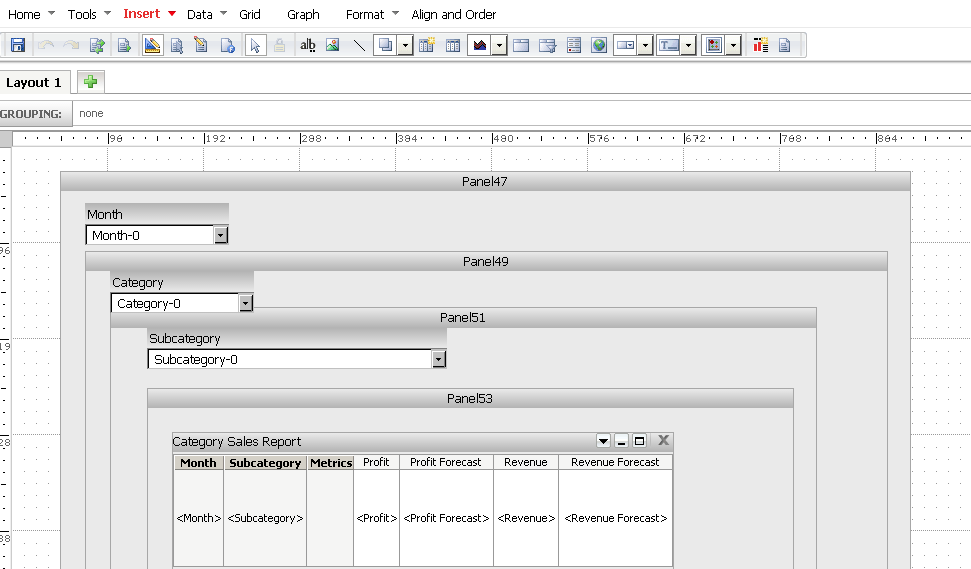
ka04W000000OgsbQAC_0EM4400000025q2.jpeg

Additionally, under the Properties and Formatting for the Body section Height can shrink and Height can grow are checked as shown below:
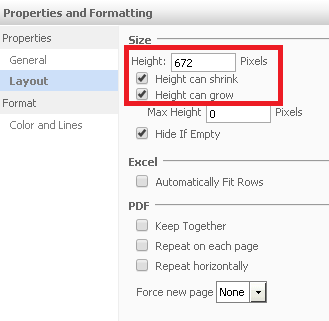
ka04W000000OgsbQAC_0EM4400000025pj.jpeg

Cause

This is a known issue with Strategy Web 9.4.1 when calculating the heights of sections in a document.
 

Action

This issue has been addressed in Strategy Web 9.4.1 HF7. Upgrade to this version to take advantage of the fix.
 

Workaround

The calculation mechanism can be disabled if Height can shrink and Height can grow are unchecked as explained below.
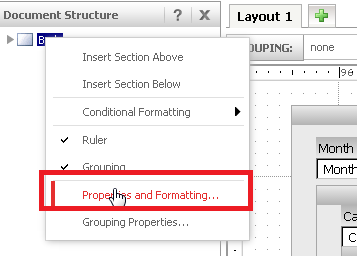
  • In Strategy Web 9.4.1 edit the document in question in Design Mode.
  • In the Document Structure pane, right click the Body element and select Properties and Formatting as shown below:
ka04W000000OgsbQAC_0EM4400000025pf.jpeg
  • Select Layout and uncheck Height can shrink and Height can grow as shown below:

ka04W000000OgsbQAC_0EM4400000025pk.jpeg
  • The document will now execute correctly in Express Mode as shown below:

ka04W000000OgsbQAC_0EM4400000025pi.jpeg


Comment

0 comments

Details

Knowledge Article

Published:

June 8, 2017

Last Updated:

June 8, 2017