EducationSoftwareStrategy.com
StrategyCommunity

Knowledge Base

Product

Community

Knowledge Base

TopicsBrowse ArticlesDeveloper Zone

Product

Download SoftwareProduct DocumentationSecurity Hub

Education

Tutorial VideosSolution GalleryEducation courses

Community

GuidelinesGrandmastersEvents
x_social-icon_white.svglinkedin_social-icon_white.svg
Strategy logoCommunity

© Strategy Inc. All Rights Reserved.

LegalTerms of UsePrivacy Policy
  1. Home
  2. Topics

KB220461: MDX Database Instance cannot be deleted from a project in MicroStrategy Analytics Enterprise 9.4.1.


Community Admin

• Strategy


MDX Database Instance cannot be deleted from a project in MicroStrategy Analytics Enterprise 9.4.1.

SUMMARY:
This technical note documents a known issue where an MDX Database Instance cannot be deleted from a project as the Remove button is grayed out, even though it no longer has any dependent objects, in Strategy Analytics Enterprise 9.4.1.
 
SYMPTOM:
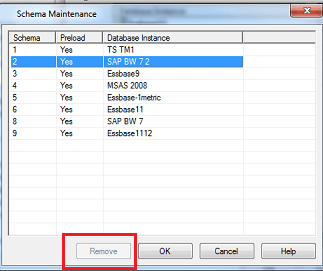
When trying to delete an MDX Database instance from Schema Maintenance, the Remove button is disabled, as shown below:
 

ka04W000000OfpTQAS_0EM440000002CBz.jpeg

 
STEPS TO REPRODUCE:

  1. Access the Project Configuration.
  2. Go to Database Instances > MDX Data Warehouses  and on the bottom right, click on Schema Maintenance.
  3. Highlight the MDX Database Instance that will be deleted and notice how the Remove button is disabled.

 
This issue occurs even after deleting all the MDX Database Instance dependent objects, as per the following technical note:
KB43370: How to remove an MDX Database Instance in MicroStrategy Desktop 9.x when the "Remove" button is grayed out.
 
CAUSE:
This is a known issue in Strategy Analytics Enterprise 9.4.1.
 
ACTION:
Contact Strategy Technical Support for an update on the status of this issue.
 
The Strategy Internal Reference Number for the issue discussed in this technical note is 924546.


Comment

0 comments

Details

Knowledge Article

Published:

April 13, 2017

Last Updated:

July 21, 2017