EducationSoftwareStrategy.com
StrategyCommunity

Knowledge Base

Product

Community

Knowledge Base

TopicsBrowse ArticlesDeveloper Zone

Product

Download SoftwareProduct DocumentationSecurity Hub

Education

Tutorial VideosSolution GalleryEducation courses

Community

GuidelinesGrandmastersEvents
x_social-icon_white.svglinkedin_social-icon_white.svg
Strategy logoCommunity

© Strategy Inc. All Rights Reserved.

LegalTerms of UsePrivacy Policy
  1. Home
  2. Topics

KB220660: A date submitted through a transaction services document is stored in the wrong format, in MicroStrategy Mobile app Android 9.4.1 Update 1.


Community Admin

• Strategy


This technical note documents an issue with MicroStrategy Mobile app Android 9.4.1 Update 1, where a date submitted through a transaction services document is stored in an unexpected format in the transaction database table.

SUMMARY:
This technical note documents an issue with Strategy Mobile app Android 9.4.1 Update 1, where a date submitted through a transaction services document is stored in an unexpected format in the transaction database table.
 
SYMPTOM:
The date inserted in a transaction services table does not have the expected format, when using Strategy Mobile app Android 9.4.1 Update 1.
 
STEPS TO REPRODUCE:
This issue can be reproduced in Strategy Tutorial, with an English (United Kingdom) operating system, where the date format should be dd/mm/yyyy.
  • Create a transaction table with two columns: date and description.
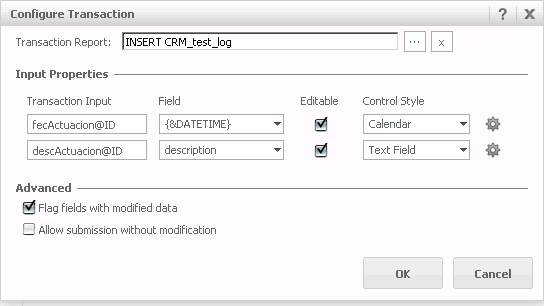
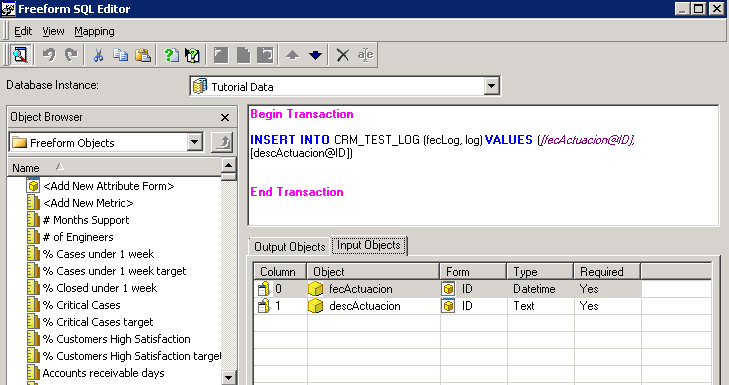
  • Create a transaction report that will insert the date picked from a date selector along with a description into the transaction table created in step 1, as shown below:
ka04W000000OaYwQAK_0EM440000002A1G.jpeg
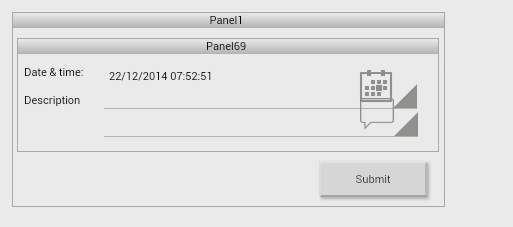
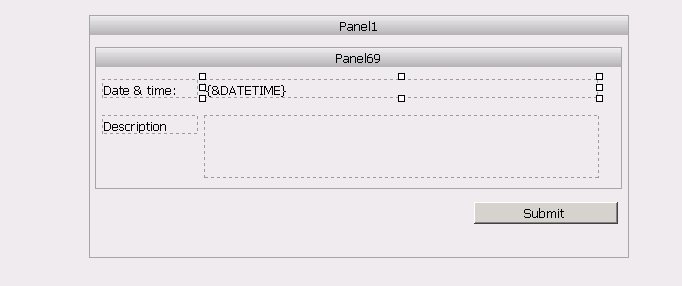
  • In Strategy Web, create a report services document and configure a transaction using the transaction report created in Step 2. Add a Submit selector that will submit the selected date and description into the transaction table.
ka04W000000OaYwQAK_0EM440000002A1H.jpeg
ka04W000000OaYwQAK_0EM440000002A1J.jpeg
  • Run the document from an Android device. Notice how the date format displays correctly:
ka04W000000OaYwQAK_0EM440000002A1E.jpeg
  • Select a date from the calendar selector and add a description. In this particular instance, the date selected is 22/12/2014 and the description is "22/12". Submit the transaction. The date format is correctly stored in the table.
  • Leave the date selected by default, add a description and submit (22/12/2014, "today's date"). The date format is stored with the wrong format in the transaction table (mm/dd/yyyy):

 
CAUSE:
This is a known issue in Strategy Mobile app Android 9.4.1 Update 1.
 
ACTION:
Strategy will continue to investigate and post updates as soon as they are available.
 
KB220660


Comment

0 comments

Details

Knowledge Article

Published:

April 11, 2017

Last Updated:

December 30, 2018