EducationSoftwareStrategy.com
StrategyCommunity

Knowledge Base

Product

Community

Knowledge Base

TopicsBrowse ArticlesDeveloper Zone

Product

Download SoftwareProduct DocumentationSecurity Hub

Education

Tutorial VideosSolution GalleryEducation courses

Community

GuidelinesGrandmastersEvents
x_social-icon_white.svglinkedin_social-icon_white.svg
Strategy logoCommunity

© Strategy Inc. All Rights Reserved.

LegalTerms of UsePrivacy Policy
  1. Home
  2. Topics

KB220694: Hierarchy prompted reports show the default prompt answers instead of the current prompt answers in MicroStrategy Mobile 9.4.1 iOS Update 4


Community Admin

• Strategy


Hierarchy prompted reports show the default prompt answers instead of the current prompt answers in MicroStrategy Mobile 9.4.1 iOS Update 4. This is fixed in MicroStrategy Mobile application 10 for iOS

SYMPTOM:
In Strategy Web 9.4.1, users can have a hierarchy prompt on the rows of a report. If the hierarchy prompt has a default prompt answer set in the prompt object for a dynamic date, in Strategy Mobile 9.4.1 iOS Update 4, the report always displays the default prompt answer instead of the actual prompt answer, like shown below.
Hierarchy prompt answered with Month: Aug 2012.

ka04W000001MKnqQAG_0EM440000002A0d.jpeg

The results on the Strategy Mobile 9.4.1 iOS Update 4 display the default prompt answer that starts with July 2012.

ka04W000001MKnqQAG_0EM440000002A0e.jpeg

 
STEPS TO REPRODUCE:

  • In a Strategy Tutorial Project, create a new prompt on the Time hierarchy.
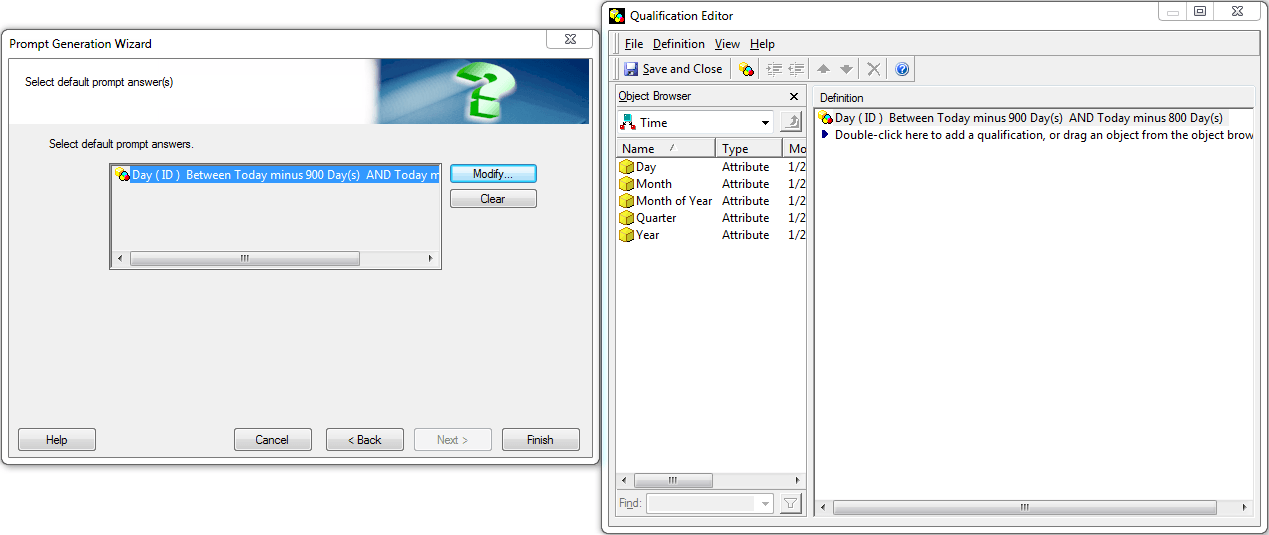
  • Answer the prompt by default with dynamic dates between 900 days ago and 800 days ago.
ka04W000001MKnqQAG_0EM440000002A0b.jpeg
  • Create a new report.
  • Add the newly created prompt to the report filter, keeping the filter as a shortcut.
  • On the report, add the time hierarchy in the rows and Profit in the columns.
  • Save and run this report on an iPad with Strategy Mobile 9.4.1 iOS Update 4.
  • Change the prompt answer to Year > 2012 > Quarter > Q3 > Add August 2012.
ka04W000001MKnqQAG_0EM440000002A0d.jpeg
  • Run the report.
  • Notice that the data shows the default prompt answer rather than the Month level that it was answered at.
ka04W000001MKnqQAG_0EM440000002A0e.jpeg
  • Run the same report in Strategy Web 9.4.1.
  • Notice that the report will take into account the new prompt answer and not the default prompt answer.

 
CAUSE:
This is a known issue in Strategy Mobile 9.4.1 iOS Update 4. Dynamic dates are qualifications that are not yet supported by Strategy Mobile 9.4.1. As a result, the application will still show the prompt to the user, but will ignore the prompt answer provided and display the results of the default prompt answer.
 
ACTION:
This issue is fixed in Strategy Mobile application 10 for iOS. 


Comment

0 comments

Details

Knowledge Article

Published:

April 7, 2017

Last Updated:

April 7, 2017