EducationSoftwareStrategy.com
StrategyCommunity

Knowledge Base

Product

Community

Knowledge Base

TopicsBrowse ArticlesDeveloper Zone

Product

Download SoftwareProduct DocumentationSecurity Hub

Education

Tutorial VideosSolution GalleryEducation courses

Community

GuidelinesGrandmastersEvents
x_social-icon_white.svglinkedin_social-icon_white.svg
Strategy logoCommunity

© Strategy Inc. All Rights Reserved.

LegalTerms of UsePrivacy Policy
  1. Home
  2. Topics

KB220767: The "Save" button is grayed out after modifying report export options in MicroStrategy Web 9.x and 10.x


Community Admin

• Strategy


This article details a known issue in MicroStrategy Web 9.x and 10.x where after exporting a report with different export settings than the default, the "Save" button is greyed out.

SYMPTOM:
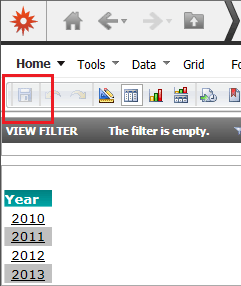
In Strategy Web 9.x and 10.x, it is possible to save export options to the report definition of a specific report by performing an export with those settings and then saving the report. However, after only making changes to a report's export options, the "Save" button remains inactive, or greyed out, in the report interface, indicating that no changes have been made, like shown below.
ka04W000000OhPEQA0_0EM4400000025nl.jpeg

STEPS TO REPRODUCE:
Follow these steps in Strategy Web 9.x and 10.x to reproduce the issue in a Strategy Tutorial project.

  1. Create a simple report.
  2. Save the report.
  3. Run the report again.
  4. Without making any changes to it, click export and change a default setting.
  5. Export the report. At this point, if the report is saved, the export options changed in step 4 should be saved to the report definition.
  6. Go back to the report and see that the "save" button is still greyed out.

CAUSE:
This is a known issue in Strategy Web 9.x and 10.x.
ACTION:
Contact Strategy Technical Support for an update on this issue.
WORKAROUND:
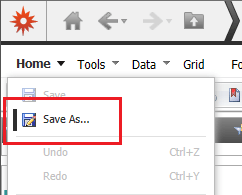
Use the "Save As" option instead, from the "home" drop-down menu, and overwrite the report to save the export options to the report definition, as shown below.
ka04W000000OhPEQA0_0EM4400000025nr.jpeg

Or make a quick change on the report's formatting and undo it, to enable the Save button.
The Strategy Internal Reference Number for the issue discussed in this technical note is 998988.


Comment

0 comments

Details

Knowledge Article

Published:

May 23, 2017

Last Updated:

May 23, 2017