EducationSoftwareStrategy.com
StrategyCommunity

Knowledge Base

Product

Community

Knowledge Base

TopicsBrowse ArticlesDeveloper Zone

Product

Download SoftwareProduct DocumentationSecurity Hub

Education

Tutorial VideosSolution GalleryEducation courses

Community

GuidelinesGrandmastersEvents
x_social-icon_white.svglinkedin_social-icon_white.svg
Strategy logoCommunity

© Strategy Inc. All Rights Reserved.

LegalTerms of UsePrivacy Policy
  1. Home
  2. Topics

KB220791: Escape character “^” is unable to be used as last character in a string value such as a password in MicroStrategy Command Manager


Community Admin

Placeholder •


The escape character (“^”) is unable to be used as the last character in a string value such as a password in MicroStrategy Command Manager.

Symptom

The escape character (“^”) is unable to be used as the last character in a string value such as a password in Strategy Command Manager.
 

Steps to reproduce

Follow the steps below to reproduce the issue in the Strategy Tutorial project:
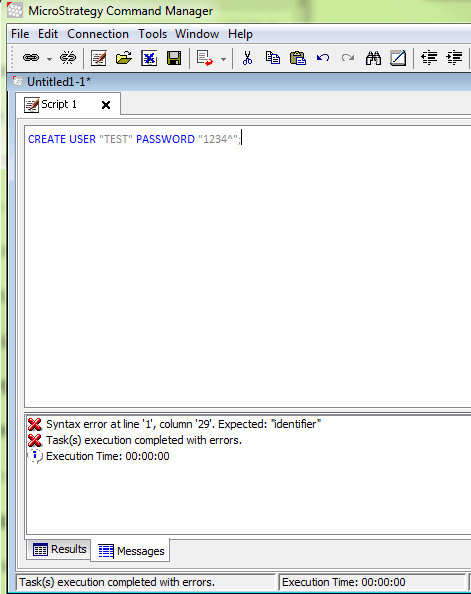
In Strategy Command Manager, creating a user with a password, for which the last character is “^”, results in an error as shown in the image below:


CREATE USER "TEST" PASSWORD "1234^";
ka04W00000148UZQAY_0EM440000002HG3.jpeg

;
 
Note: In Strategy Desktop/Developer, the escape character (“^”) could be used as the last character in the string in the password.
 

Cause

This is a known issue with Strategy Command Manager.
 

Action

Currently it is not scoped for any upcoming scheduled Strategy release.


Comment

0 comments

Details

Knowledge Article

Published:

May 10, 2017

Last Updated:

May 10, 2017