Users can improve the organization of their project in Architect by creating groups of tables known as layers. These layers provide more accessibility and focus for groups of tables, especially in Strategy projects that require a large number of tables.
In the “Project Tables View” of Architect, a user can select one or more tables and define the group of tables as a layer by pressing the “Create New Layer” button in the Layer toolbar.

This layer can be accessed from the Layers drop-down list to focus on only the tables included in the layer. Any modifications performed while viewing a layer are applied to the project as a whole.
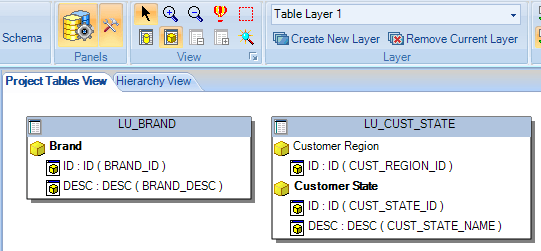
The “All Project Tables” layer is a default layer that includes all tables in a project. This layer cannot be deleted.

Layers are currently stored in the project property set and not as an object type, so users are not able to migrate Architect layers over to new projects.
