EducationSoftwareStrategy.com
StrategyCommunity

Knowledge Base

Product

Community

Knowledge Base

TopicsBrowse ArticlesDeveloper Zone

Product

Download SoftwareProduct DocumentationSecurity Hub

Education

Tutorial VideosSolution GalleryEducation courses

Community

GuidelinesGrandmastersEvents
x_social-icon_white.svglinkedin_social-icon_white.svg
Strategy logoCommunity

© Strategy Inc. All Rights Reserved.

LegalTerms of UsePrivacy Policy
  1. Home
  2. Topics

Checkbox filters on an attribute with a large number of elements crashes the browser in Visual Insight in MicroStrategy 9.4.1


Alejandro Olvera Velasco

Product Manager, Principal • MicroStrategy


Starting with the release of Strategy ONE (March 2024), dossiers are also known as dashboards.

Description

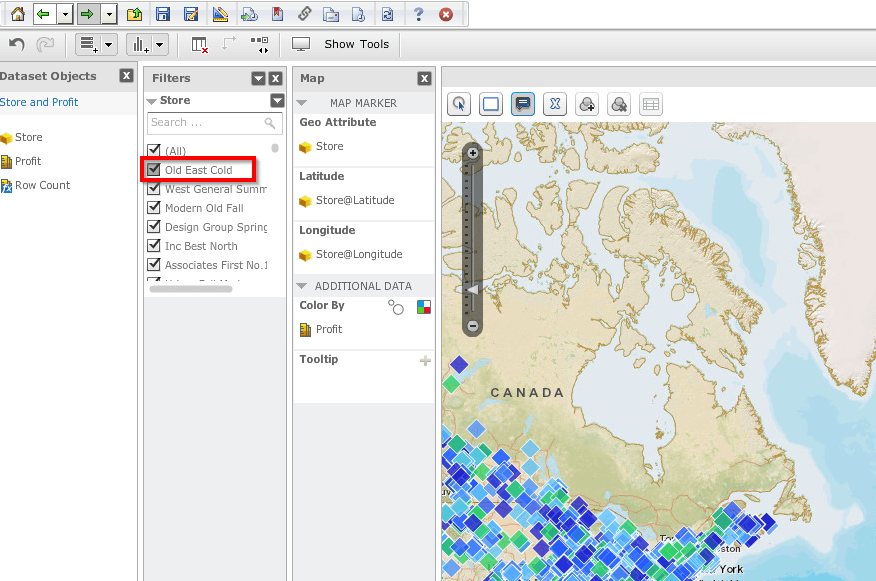
This knowledge base describes a known issue with Strategy Web 9.4.1 for Visual Insight, which causes browsers to crash when an attribute with a large number of elements is added to the Filter section with the checkbox style. After adding an attribute with a large number of elements to the Filter section of a Visual Insight dashboard, with the checkbox style, unchecking one of the elements causes the browser to crash in Strategy Web 9.4.1, as seen below.
 

ka0PW0000001JZOYA2_0EM4400000025o5.jpeg


Steps to reproduce

Follow these steps in the Strategy Tutorial project:
 

  1. Create a Report with Store and Profit. 
  2. Create a Dashboard using the Report as a dataset.
  3. Choose any visualization except for Grid.

    Note: For a Grid, the browser will not crash, but will take a long time to load.
  4. Place Store in the Filter section.
  5. Change the Filter display style to Checkbox.
  6. Uncheck any element.


Why is this happening?

In Strategy Web 9.4.1, Visual Insight is rendered using Adobe Flash, which requests all the data to the server to then be rendered at the client machine. When the list of elements is too big, it can consume the resources of the client machine, thus crashing the browser.
 

Solution

When filtering on an attribute with a large number of elements in Visual Insight, use the search box instead of the checkbox style. Our engineers our working to enhance the overall Strategy experience.

Learning Resources

Interested in learning more about Documents or Dossier authoring? Visit the Learning Center on Community!
Or go to our Documentation pages for more product information.


Comment

0 comments

Details

Knowledge Article

Published:

March 31, 2017

Last Updated:

March 21, 2024