Most complex transactional applications contain some form of conditional logic embedded in them. For example, when filling out a survey, if you answer Question 1 with “Yes”, then Question 2 appears for you to enter comments and becomes required. However, if you answer with “No,” then you never see question 2. Below we will highlight this feature in action.
Note: The following example contains reports and documents which have been already prepared to demonstrate this feature.

2. Here, we will add a condition that prohibits users from submitting a transaction for the Miami Call Center. When a user selects Miami as Call Center, the Submit button will become disabled.
3. In order to do this, ensure that Disable is selected in the Action Selector, then click on the green + sign

4. Select Call Center@DESC > Equals >Miami:
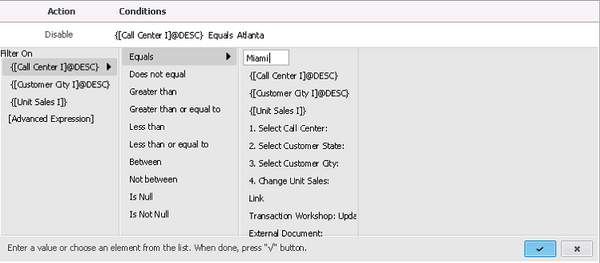
5. Click Apply (check mark) and OK.
6. Save the document. Go to Express mode and select Miami as the Call Center. Notice that the Submit button will become disabled.
Note: Transaction Conditions feature is only available in Strategy Web and Mobile Client for iOS. It's not supported in Strategy Mobile Client for Android.
