EducationSoftwareStrategy.com
StrategyCommunity

Knowledge Base

Product

Community

Knowledge Base

TopicsBrowse ArticlesDeveloper Zone

Product

Download SoftwareProduct DocumentationSecurity Hub

Education

Tutorial VideosSolution GalleryEducation courses

Community

GuidelinesGrandmastersEvents
x_social-icon_white.svglinkedin_social-icon_white.svg
Strategy logoCommunity

© Strategy Inc. All Rights Reserved.

LegalTerms of UsePrivacy Policy
  1. Home
  2. Topics

KB221359: The Drilling icon in ESRI Maps disappears when the only drilling option available is the System Hierarchy for attributes, in MicroStrategy Web 9.3.1


Community Admin

• Strategy


Prior to MicroStrategy Web 9.3.1, users could drill in ESRI maps following a predetermined order of precedence.

SYMPTOM:
Prior to Strategy Web 9.3.1, users could drill in ESRI maps following a predetermined order of precedence. The three drilling options for the ESRI Map widget are listed below:

  • Drilling using the system hierarchy for attributes
  • Drilling using a custom drill path
  • Edit Links drilling

When Edit Links Drilling was enabled, it would override the other two drill options, and custom drill paths would override system heirarchy drilling. However, in Strategy Web 9.3.1 and later, even when Edit Links drilling and custom drill paths are disabled. users are not able to drill using system hierarchy for attributes. The drilling icon disappears from the options as soon as the prior two drilling options are disabled, as shown below:
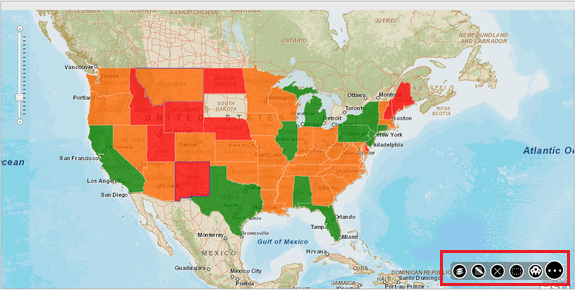
With Edit Links drilling enabled:
ka04W000000OaTwQAK_0EM4400000025nA.jpeg

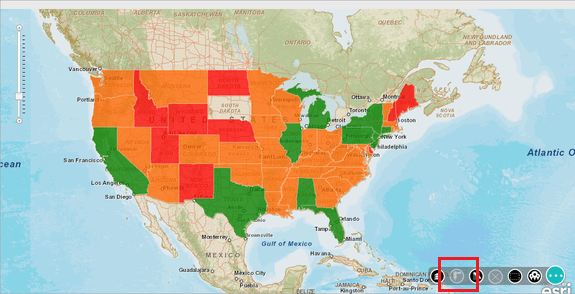
With Edit Links drilling disabled:

ka04W000000OaTwQAK_0EM4400000025n9.jpeg

Notice the drill button has disappeared.
 
CAUSE:
This is working as designed in Strategy Web 9.3.1. Drilling using the system hierarchy for attributes is no longer supported for ESRI maps.
KB221359


Comment

0 comments

Details

Knowledge Article

Published:

May 16, 2017

Last Updated:

November 23, 2018