SYMPTOM:
When accessing Strategy Web 9.4.1, users see inconsistent scroll bar behavior in the Safari browser across different Mac OS versions. The different scroll bar behaviors are described below:
In Mac OSX 10.9.4, Safari scroll bars only appear when mousing over an object.
In Mac OSX Yosemite, Safari scroll bars always appear, even when the mouse is not hovering over an object.
CAUSE:
Strategy Web 9.4.1 does not have a setting that determines whether or not scroll bars will appear only when the mouse is hovered over the object. Instead, there is a MAC OS level setting in the "General" section of "System Preferences" that determines the scroll bar behavior, as shown below:
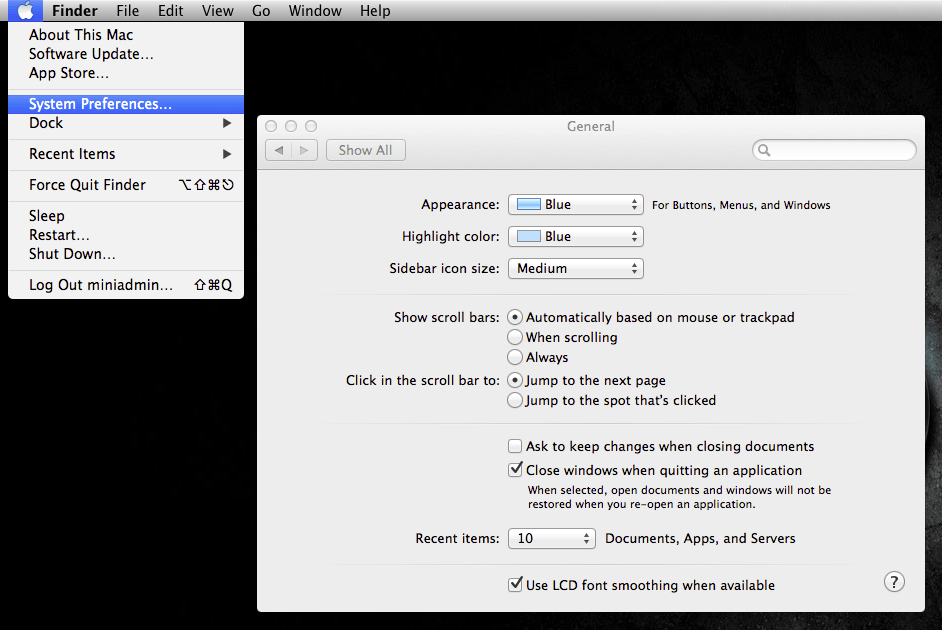
The three scroll bar settings shown above are:
ACTION:
Change the scroll bar setting to the desired scroll bar behavior.
