EducationSoftwareStrategy.com
StrategyCommunity

Knowledge Base

Product

Community

Knowledge Base

TopicsBrowse ArticlesDeveloper Zone

Product

Download SoftwareProduct DocumentationSecurity Hub

Education

Tutorial VideosSolution GalleryEducation courses

Community

GuidelinesGrandmastersEvents
x_social-icon_white.svglinkedin_social-icon_white.svg
Strategy logoCommunity

© Strategy Inc. All Rights Reserved.

LegalTerms of UsePrivacy Policy
  1. Home
  2. Topics

KB221384: HTML tags in tooltips display as static text in DHTML modes in MicroStrategy Web 9.4.1.


Community Admin

• Strategy


SYTMPTOM:
In Strategy Web 9.4.1, HTML tags included in graph tooltips will display as static text, as shown below:

ka04W000000OhNMQA0_0EM4400000025mg.jpeg

This issue did not occur in Strategy Web 9.0.1.
 
STEPS TO REPRODUCE:
To reproduce this issue, follow the steps below:
  • In Strategy Developer 9.4.1, create a bar graph.
  • Edit the bar graph by clicking the Graph icon.
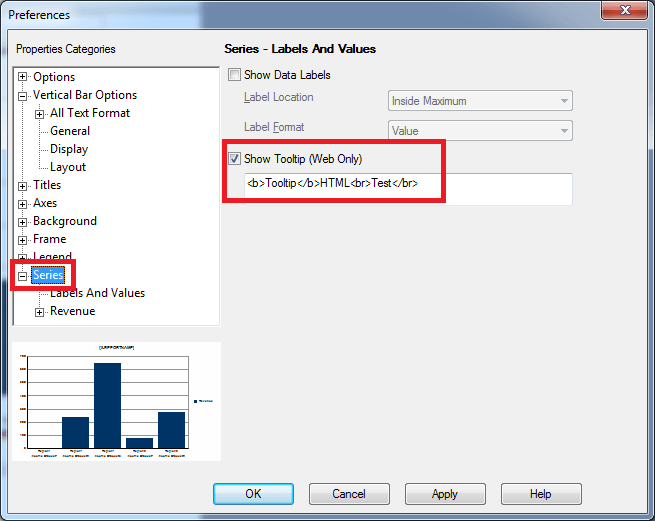
  • Go to Graph Options > Series > Tooltip (Web Only)
  • Add the following tooltip: 
    <b>Tooltip</b>HTML<br>Test</br>
    as shown below:
ka04W000000OhNMQA0_0EM4400000025mi.jpeg
  • Run this document in Interactive Mode in Strategy Web 9.4.1. Notice the HTML tags are not taken into account. Instead, they display as text.

 
CAUSE:
This is working as designed in Strategy Web 9.4.1. Although the HTML tags worked in previous versions of Strategy, this behavior was changed to take into account cross-site scripting vulnerabilities.
 
ACTION:
This has been addressed in Strategy Web 9.4.1 Hotfix 8. Upgrade to this version to take advantage of this fix.
 
The Strategy Internal Reference Number for the issue discussed in this technical note is 984088.


Comment

0 comments

Details

Knowledge Article

Published:

May 24, 2017

Last Updated:

May 24, 2017