EducationSoftwareStrategy.com
StrategyCommunity

Knowledge Base

Product

Community

Knowledge Base

TopicsBrowse ArticlesDeveloper Zone

Product

Download SoftwareProduct DocumentationSecurity Hub

Education

Tutorial VideosSolution GalleryEducation courses

Community

GuidelinesGrandmastersEvents
x_social-icon_white.svglinkedin_social-icon_white.svg
Strategy logoCommunity

© Strategy Inc. All Rights Reserved.

LegalTerms of UsePrivacy Policy
  1. Home
  2. Topics

KB221466: How to remove the Select Distinct in report SQL in MicroStrategy Analytics


Stefan Zepeda

Salesforce Solutions Architect • Strategy


This article describes how to remove the select distinct from report SQL for supported reports

By default, for report SQL, if no aggregation is needed and the attribute defined on the table is not a primary key, the SQL engine uses SELECT DISTINCT in Select statement. In some scenarios, users would like to disable the usage of SELECT DISTINCT for specific query purpose. 
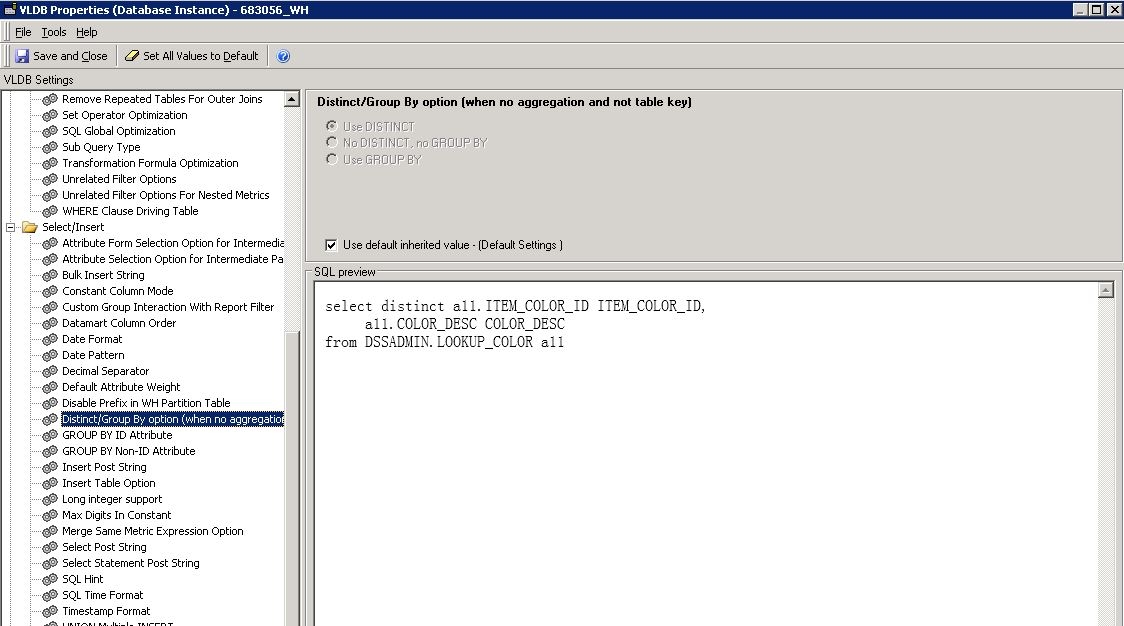
The generation of Distinct or Group By in the SQL statement is controlled by a VLDB property called "Distinct/Group by Option(when no aggregation and not table key)" which is available at the Database Instance level. Follow the steps below to change the property.
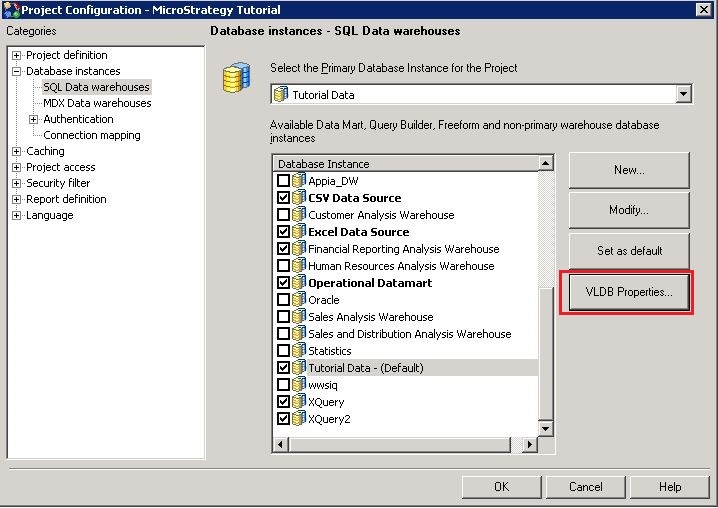
  • Launch Project Configuration, select "SQL Data warehouses" under "Database instances" tab. Choose the database instance and then open VLDB Properties.  
ka02R000000kcVaQAI_0EM440000002C6x.jpeg
  • In the VLDB Properties, locate option "Distinct/Group by Option(when no aggregation and not table key)" under Select/Insert tab.  
ka02R000000kcVaQAI_0EM440000002C6u.jpeg

The following three options are available for the VLDB property "Distinct/Group by Option(when no aggregation and not table key)". If the user would like to disable SELECT DISTINCT in report SQL, they can uncheck Use default and choose either "No DISTINCT, no GROUP BY" or "Use GROUP BY". 

  • Use DISTINCT (default)
  • No DISTINCT, no GROUP BY
  • Use GROUP BY

 
Below is a comparison of the report SQLs generated when each option is applied.

  • Use DISTINCT (default)


select distinct a11.ITEM_COLOR_ID ITEM_COLOR_ID, 
a11.COLOR_DESC COLOR_DESC 
from DSSADMIN.LOOKUP_COLOR a11 

  • No DISTINCT, no GROUP BY


select a11.ITEM_COLOR_ID ITEM_COLOR_ID, 
a11.COLOR_DESC COLOR_DESC 
from DSSADMIN.LOOKUP_COLOR a11 

  • Use GROUP BY


select a11.ITEM_COLOR_ID ITEM_COLOR_ID, 
max(a11.COLOR_DESC) COLOR_DESC 
from DSSADMIN.LOOKUP_COLOR a11 
group by a11.ITEM_COLOR_ID 

 
Users should be aware that the SQL engine would ignore the option selected for this property in the following situations: 

  • If there is aggregation, GROUP BY is used without the use of DISTINCT.
  • If there is no attribute (only metrics), DISTINCT is not used.
  • If there is COUNT (DISTINCT …) and the database does not support this functionality, a SELECT DISTINCT pass of SQL is used, which is followed by a COUNT(*) pass of SQL.
  • If the database does not allow DISTINCT or GROUP BY for certain column data types, DISTINCT and GROUP BY are not used.
  • If the select level is the same as the table key level and the table’s true key property is selected, DISTINCT is not used.

 
When none of the above conditions are met, the option selected for this property determines how DISTINCT and GROUP BY are used in the SQL statement.


Comment

0 comments

Details

Knowledge Article

Published:

April 14, 2017

Last Updated:

April 14, 2017