SYMPTOM
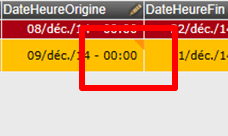
In Strategy Web 9.x, when setting an attribute or metric in a Transaction Services grid to Calendar control style and choosing to include time, the time part revert back to 00:00 after making changes to the date and time value and clicking on any blank space, as shown below:
Before click outside of the cell:

After click any blank space:
The same behavior is reproduced when using the Time Picker control style.
CAUSE
This is because the attribute or metric used in Transaction Service grid is not correctly defined as "Datetime" data type, as shown below:

For a calendar control style which include time or a time picker control style, the attribute/metric must be defined as "Datetime". A "Date" type data will cause the time information lost upon submission.
ACTION
Set the input object's data type to "Datetime".
KB221484
