SUMMARY:
This issue occurs in Strategy Desktop/Developer 9.x using SQL Server 2008 or above configured with the default ODBC driver.
SYMPTOM:
In Strategy Developer 9.x, users receive the following error when running a report with a date attribute in the page-by:
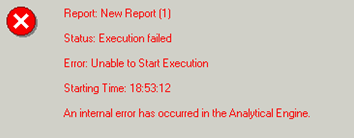
Error: Unable to Start Execution
An internal error has occurred in the Analytical Engine.
CAUSE:
This issue occurs when SQL Server 2008 or above is configured with the default ODBC driver with the Strategy Intelligence Server 9.x. Prior to SQL Server 2008, DATE and TIME data types were not supported, thus the default ODBC driver that comes pre-installed does not support the new data types.
ACTION:
Download and install the native client driver for SQL Server 2008 or above and configure the ODBC driver with it. Refer to technical note KB40734 for more information on configuring this driver.
