EducationSoftwareStrategy.com
StrategyCommunity

Knowledge Base

Product

Community

Knowledge Base

TopicsBrowse ArticlesDeveloper Zone

Product

Download SoftwareProduct DocumentationSecurity Hub

Education

Tutorial VideosSolution GalleryEducation courses

Community

GuidelinesGrandmastersEvents
x_social-icon_white.svglinkedin_social-icon_white.svg
Strategy logoCommunity

© Strategy Inc. All Rights Reserved.

LegalTerms of UsePrivacy Policy
  1. Home
  2. Topics

KB22161: How to set the sorting for a report that gets its metrics from an object prompt.


Community Admin

• Strategy


An object prompt in MicroStrategy allows you to be able to choose the metrics that you want to use in a specific report; however, after doing this, the metrics in the report are not sorted, even after saving the report with the sorting; this document explains how to achieve the sorting of such a report.

SUMMARY:
An object prompt in Strategy allows you to be able to choose the metrics that you want to use in a specific report; however, after doing this, the metrics in the report are not sorted, even after saving the report with the sorting; this document explains how to achieve the sorting of such a report.
 
Setting the sorting of a report that gets its metrics from a selection in an object prompt
Object prompts in Strategy allow you to select metrics that can be used in a report, however, when using an object prompt that can only select one metric and setting the sorting accordingly, after running the report again and selecting a different metric, the report is not sorted.
In order for the sorting to work as expected, follow the next steps:
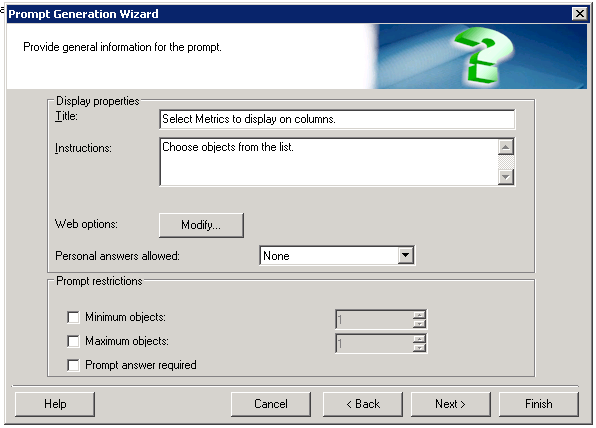
  • Modify the prompt so that multiple metrics can be selected.
ka04W000000OhMYQA0_0EM440000002CB1.jpeg
  • Run the report choosing all the metrics.
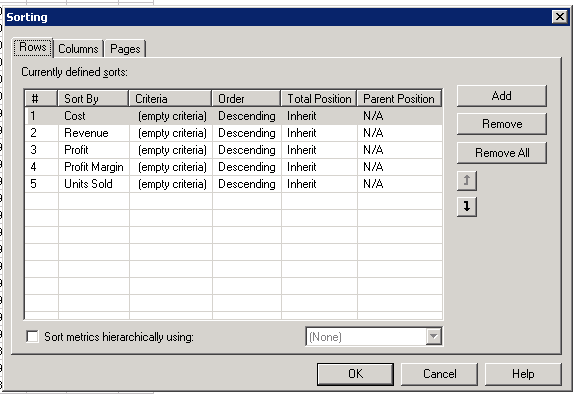
  • Go to Data – Advanced Sorting and set the Sorting for all metrics (Ascending or Descending).
ka04W000000OhMYQA0_0EM440000002CB2.jpeg
  • Save and close the report.
  • Change the settings of the Object prompt back so that it only allows the user to choose one metric.
  • Run the report again selecting one metric, and notice that the sorting is retained.

Comment

0 comments

Details

Knowledge Article

Published:

May 24, 2017

Last Updated:

May 24, 2017