EducationSoftwareStrategy.com
StrategyCommunity

Knowledge Base

Product

Community

Knowledge Base

TopicsBrowse ArticlesDeveloper Zone

Product

Download SoftwareProduct DocumentationSecurity Hub

Education

Tutorial VideosSolution GalleryEducation courses

Community

GuidelinesGrandmastersEvents
x_social-icon_white.svglinkedin_social-icon_white.svg
Strategy logoCommunity

© Strategy Inc. All Rights Reserved.

LegalTerms of UsePrivacy Policy
  1. Home
  2. Topics

KB221689: Images in the headers of a report will be misaligned with the grid when exported to PDF in MicroStrategy Developer 9.4.1.


Stefan Zepeda

Salesforce Solutions Architect • Strategy


Images in the headers of a report will be misaligned with the grid when exported to PDF in MicroStrategy Developer 9.4.1.

SYMPTOM: 
When exporting a report to PDF, users have the option to insert an image into the headers of the export. However, in Strategy Developer 9.4.1, when the report is exported to PDF, the image and the grid below it will be misaligned as shown below:

ka02R000000kcbZQAQ_0EM440000002C6p.jpeg

STEPS TO REPRODUCE:

  • In Strategy Developer 9.4.1, create a report with at least one attribute in the rows.
  • Execute the report.
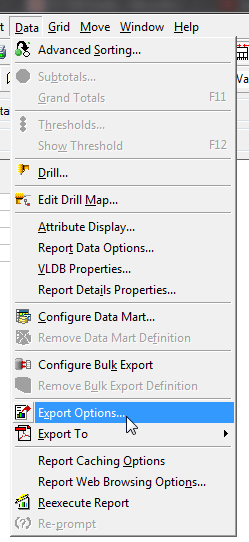
  • Find the "Export Options" under the Data menu, as shown below:
ka02R000000kcbZQAQ_0EM440000002C6t.jpeg
  • Click on "Advanced Options".
  • Select "Header/Footers".
  • Select the picture icon shown bleow:
ka02R000000kcbZQAQ_0EM440000002C6s.jpeg
  • Add an image.
  • Perform the export and compare the alignments.

 
CAUSE:
This is a known issue in Strategy Developer 9.4.1.
 
ACTION:
Currently this issue is still being reviewed for feasibility by our Technology team and it is not scoped for any upcoming scheduled Strategy release.


Comment

0 comments

Details

Knowledge Article

Published:

April 11, 2017

Last Updated:

April 11, 2017