EducationSoftwareStrategy.com
StrategyCommunity

Knowledge Base

Product

Community

Knowledge Base

TopicsBrowse ArticlesDeveloper Zone

Product

Download SoftwareProduct DocumentationSecurity Hub

Education

Tutorial VideosSolution GalleryEducation courses

Community

GuidelinesGrandmastersEvents
x_social-icon_white.svglinkedin_social-icon_white.svg
Strategy logoCommunity

© Strategy Inc. All Rights Reserved.

LegalTerms of UsePrivacy Policy
  1. Home
  2. Topics

KB413741: "Error: form category cannot be modified because the definition of one or more application objects depend on its current definition" error occurs when attempting to modify a Form Category in MicroStrategy 9.4.1


Community Admin

• Strategy


This issue has been classified as a defect by MicroStrategy. The issue occurs when editing a form category used for attribute forms with dependents such as reports or documents. One workaround is available. A solution/code fix for this issue is not available in current releases but is being reviewed for a future MicroStrategy release.

SUMMARY:
This issue has been classified as a defect by Strategy. The issue occurs when editing a form category used for attribute forms with dependents such as reports or documents. One workaround is available. A solution/code fix for this issue is not available in current releases but is being reviewed for a future Strategy release.
 
SYMPTOM:
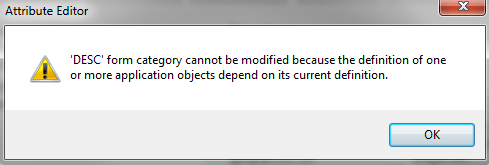
In Strategy Developer 9.4.1, users are unable to modify the Form Category of an attribute form when the attribute form has dependents such as reports or documents. After editing the Form category and attempting to save the attribute, the following error appears:
 

ka04W000000ObkLQAS_0EM440000002CAD.jpeg


'DESC' form category cannot be modified because the definition of one or more application objects depend on its current definition.

 
 
STEPS TO REPRODUCE:

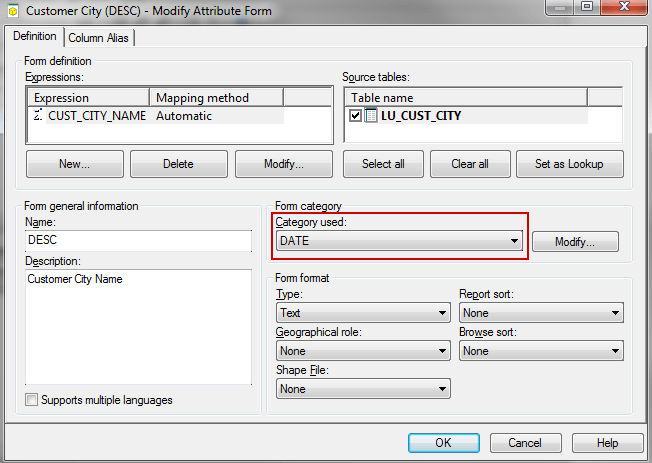
  • In Strategy Tutorial, edit the attribute ‘Customer City’.
  • Select the DESC form and hit Modify as shown below:
ka04W000000ObkLQAS_0EM440000002CAF.jpeg
  • Under Form category, select ‘DATE’ in the Category used drop-down, like shown below:
ka04W000000ObkLQAS_0EM440000002CAJ.jpeg
  • Hit OK and notice the error message appears.


CAUSE:
This is a known issue with modifying a Form Category that is used for attribute forms displayed in reports or documents in Strategy 9.4.1.
 
 
ACTION:
Strategy will continue to investigate and post updates as soon as they are available..
 
 
WORKAROUND: 
The attribute form can be deleted from Strategy Architect, accessible in Strategy Developer, under Schema Menu > Architect.
 
Another workaround can be to manually remove the attribute form from the dependent reports and/or documents before modifying the Form Category.
 
 
The internal reference number for the issue described in this technical note is 1001133.
KB413741 KB413741


Comment

0 comments

Details

Knowledge Article

Published:

June 9, 2017

Last Updated:

December 19, 2018