EducationSoftwareStrategy.com
StrategyCommunity

Knowledge Base

Product

Community

Knowledge Base

TopicsBrowse ArticlesDeveloper Zone

Product

Download SoftwareProduct DocumentationSecurity Hub

Education

Tutorial VideosSolution GalleryEducation courses

Community

GuidelinesGrandmastersEvents
x_social-icon_white.svglinkedin_social-icon_white.svg
Strategy logoCommunity

© Strategy Inc. All Rights Reserved.

LegalTerms of UsePrivacy Policy
  1. Home
  2. Topics

KB221772: The Search box in a Check box selector does not update other selectors or grids in Visual Insight in MicroStrategy Web 9.4.1.


Community Admin

• Strategy


This Technical Note describes how using the search box in a check box selector does not update the selector selections or the grid in MicroStrategy Web in Visual Insight.

SUMMARY:
This Technical Note describes how using the search box in a check box selector does not update the selector selections or the grid in Strategy Web 9.4.1 in Visual Insight.
 
SYMPTOM:
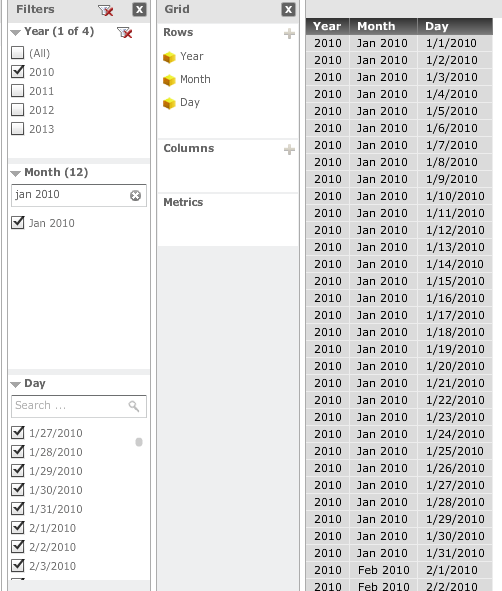
In Visual Insight for Strategy Web 9.4.1, if a check box selector contains more than 15 elements, a search box will automatically display. When displaying three check box selectors and the filtering mode is set to filter all, using the Search box in one of the check box selectors does not automatically update the other filters below. 
Consider the following scenario where the Month search box filters for Jan 2010, but the Day check box still displays all:
ka04W000000Ofo1QAC_0EM4400000025jZ.jpeg

 
STEPS TO REPRODUCE:
Follow these steps to reproduce the issue in a Strategy Tutorial Project:
  • Create a report with the Year, Month, and Day attributes.
  • Create a Visual Insight dashboard with a grid visualization.
  • Add Year, Month, and Day to the filter.
  • Set the display style of all three filters to check boxes.
  • Set the 'Filtering Mode' to 'Filter All'.
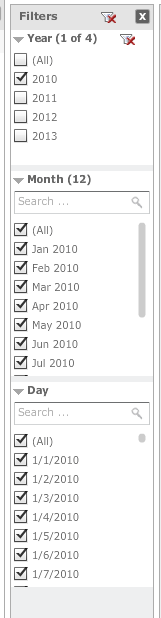
  • Select Year = 2010, like shown in the image below.
ka04W000000Ofo1QAC_0EM4400000025jV.jpeg
  • Use the search box in the month filter to find Jan 2010, and hit enter. The results should look as below:
ka04W000000Ofo1QAC_0EM4400000025jZ.jpeg
  • Notice the date filter and the grid do not get filtered by applying the filter on the Month search box selector.

CAUSE:
This is working as designed in Strategy Web 9.4.1. The Month filter search box is only meant to filter the display results of the filter itself. Applying the filter from the search box, displays the month being filtered on and now that it is easier to find, users can check or uncheck that element. A request has been logged to address this issue.
 
ACTION:
Currently this issue is still being reviewed for feasibility by our Technology team and it is not scoped for any upcoming scheduled Strategy release.


Comment

0 comments

Details

Knowledge Article

Published:

March 31, 2017

Last Updated:

July 21, 2017