EducationSoftwareStrategy.com
StrategyCommunity

Knowledge Base

Product

Community

Knowledge Base

TopicsBrowse ArticlesDeveloper Zone

Product

Download SoftwareProduct DocumentationSecurity Hub

Education

Tutorial VideosSolution GalleryEducation courses

Community

GuidelinesGrandmastersEvents
x_social-icon_white.svglinkedin_social-icon_white.svg
Strategy logoCommunity

© Strategy Inc. All Rights Reserved.

LegalTerms of UsePrivacy Policy
  1. Home
  2. Topics

KB221776: "No results returned" displays when running the script LIST SCHEDULERELATIONS in MicroStrategy Command Manager


Community Admin

• Strategy


This technical note describes an issue with running the script LIST SCHEDULERELATIONS in MicroStrategy Command Manager 10.x. This script is no longer used to return the list of schedules at the user or project levels.

SUMMARY:
This technical note describes an issue with running the script LIST SCHEDULERELATIONS in Strategy Command Manager 10.x. This script is no longer used to return the list of schedules at the user or project levels.
SYMPTOM:
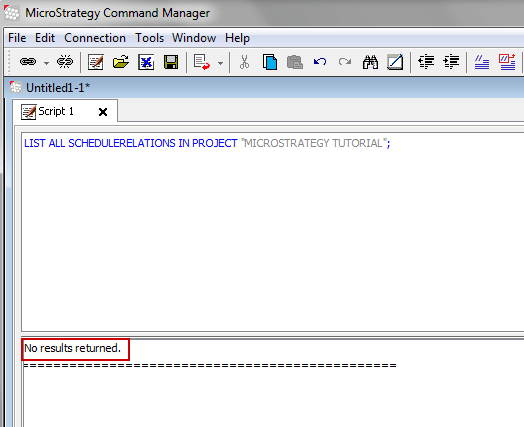
In Strategy Command Manager 10.x, when any user, including the Administrator user, runs the script ‘LIST SCHEDULERELATIONS’ for a user, group or project, no results are returned:
 

ka04W000000Oe2aQAC_0EM440000002CA9.jpeg


 No results returned.

 
STEPS TO REPRODUCE:

  1. Connect to the Strategy Tutorial project source as an Administrator in Command Manager
  2. Run the below script and notice the issue
    
    ‘LIST ALL SCHEDULERELATIONS IN PROJECT "Strategy TUTORIAL";

  
CAUSE:
This is working as designed. Starting with Strategy Command Manager 9.x, the script ‘LIST SCHEDULERELATIONS’ is no longer used to list subscriptions at the user, group, or project level.
 
ACTION:
To list the schedules at the user, group, or project level run the following script in Command Manager 10.x:


LIST [ALL] SUBSCRIPTIONS FOR RECIPIENTS (CONTACT "<contact_name>"  | ADDRESS "<address_name>" | CONTACTGROUP "<contact_group_name>" | USER "<login_name>" | GROUP "<user_group_name>") FOR PROJECT "<project_name>";

For example, to list the subscriptions for group ‘Test’ in the project ‘Strategy Tutorial’, the script would be as follows:
 

LIST SUBSCRIPTIONS FOR RECIPIENTS GROUP "Test" FOR PROJECT "Strategy Tutorial";

 
Note: Subscriptions created at the GROUP level will be listed in Command Manager at the GROUP level only. Just as, if the subscriptions were created at the USER level, they will be listed in Command Manager at the USER level. This is because when individual users create a schedule subscription to a report, an individual user schedule relation instance is created and not a group schedule relation instance.


Comment

0 comments

Details

Knowledge Article

Published:

April 3, 2017

Last Updated:

April 3, 2017