EducationSoftwareStrategy.com
StrategyCommunity

Knowledge Base

Product

Community

Knowledge Base

TopicsBrowse ArticlesDeveloper Zone

Product

Download SoftwareProduct DocumentationSecurity Hub

Education

Tutorial VideosSolution GalleryEducation courses

Community

GuidelinesGrandmastersEvents
x_social-icon_white.svglinkedin_social-icon_white.svg
Strategy logoCommunity

© Strategy Inc. All Rights Reserved.

LegalTerms of UsePrivacy Policy
  1. Home
  2. Topics

KB221859: PRIME partitioning guidelines for MicroStrategy Secure Enterprise Platform


Community Admin

• Strategy


This document provides guidelines to efficiently use MicroStrategy Secure Enterprise Platform PRIME partitioning as well as provide awareness of the limitations it has.

SUMMARY
This document provides guidelines to efficiently use Strategy 10 Secure Enterprise Platform PRIME partitioning as well as provide awareness of the limitations it has.
What is Strategy PRIME?
Strategy PRIME is a new feature added in Strategy 10 Secure Enterprise Platform, which represents the evolution of the OLAP Intelligent Cubes. Its name stands for Strategy Parallel Relational In-Memory Engine.
 
Strategy PRIME uses Strategy Web Data Import Tool to build In-Memory Cubes  that will be used by the PRIME Engine to fulfill data requests. One of the most interesting features of this In-Memory Cubes is the capacity to handle partitioning.
For additional information information on Strategy Prime, refer to the following Strategy Knowledge Base Document:
KB221530: Strategy PRIME overview for Strategy 10 Secure Enterprise Platform
What is partitioning?
Partitioning is the act of distributing data across multiple cores on a single box and/or distributing data across nodes in a Massively Parallel Processing Cluster to enable parallel processing of information.
On the single node edition of PRIME, this is accomplished by harnessing the power of all CPU cores. Each data partition is in a “shared nothing” architecture and will only work with only its own corresponding CPU core or cores.
Note: This does not refer to an Intelligence server cluster. It is not possible to partition a cube on multiple nodes of an Intelligence server.
 
How is partitioning accessed ? 
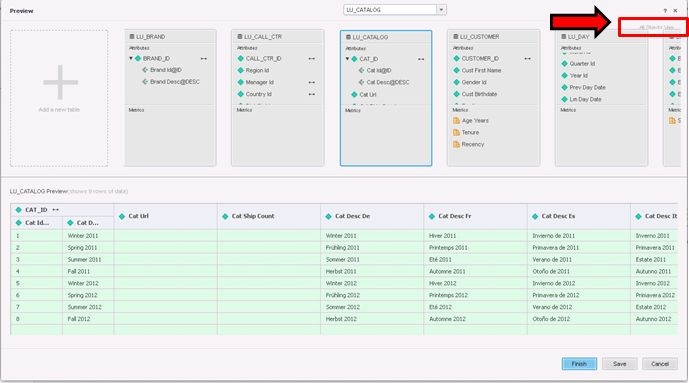
Once some tables or files have been imported in the Strategy Data Import Tool, access to the "All Objects Vew".
ka04W00000148c4QAA_0EM4400000029JQ.jpeg

 
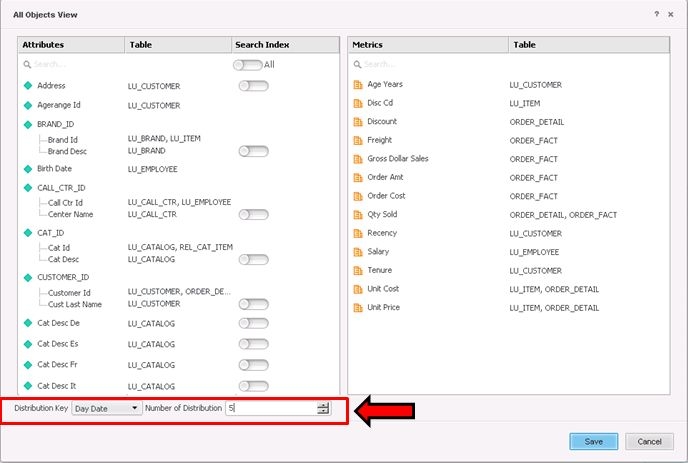
Once in the All objects view, the partitioning attribute (or Distribution Key) can be selected, and also, the number of partitions (or Distributions) can be defined.
 

ka04W00000148c4QAA_0EM4400000029JJ.jpeg

For more information on partitioning, see How to Partition Large Datasets and Create Search Indexes.
Important considerations:

  • Partitioning does limit the types of aggregations that can be performed on the raw data. A list of functions that can be handled include distributive functions such as – SUM, MIN, MAX, COUNT, PRODUCT, or semi-distributive functions such as STD DEV, VARIANCE that can be re-written as distributive functions.
  • Scalar functions such as Add, Greatest, Date/Time Functions, String manipulation functions, etc. are also supported.
  • DISTINCT COUNTs on the partition attribute are also supported.
  • Derived metrics using any of the Strategy 250+ functions are supported

Picking a partition attribute and number of partitions:

  1. Strategy PRIME currently supports only one partitioning key/attribute for the entire dataset. All tables that have the partition attribute will have their data distributed along the elements of that attribute.
  2. Strategy PRIME currently supports all flavors of INT data types, STRING/TEXT data type as well DATE data types for partitioning. INT data and TEXT/DATE data is distributed using HASH schemes.
  3. The partition attribute is typically dictated by the specific application needs. Below are some general guidelines on identifying a good partition attribute:
  • Some of the largest fact tables in the application are typically good candidates for partitioning and thus influence the choice of the partition attribute. They need to be partitioned in order to accommodate large data sizes and also take advantage of PRIME’s parallel processing architecture.
  • Data should be partitioned in such a way that it allows for the most number of partitions to be involved in any question that is asked of the application. Attributes that are frequently used for filtering or selections don’t make for good partition attributes, as they tend to push the analysis towards specific sets of partitions thus minimizing the benefits of parallel processing.
  • Partition attribute should also allow for near uniform distribution of data across the partitions, so that the workload on each partition is more evenly distributed.
  • Columns on which some of the larger tables in the application are joined also make for good partition attributes.
  • Typically, the number of partitions should be set to be not more than "half the number of logical cores" in the PRIME server. Defining a larger number will hinder performance.
  • Each partition can hold a maximum of 2 billion rows, so the number of partitions should be picked accordingly.
  • Lower cap on the number of partitions would be dictated by the number of rows in the largest table divided by 2 billion, since each partition can hold up to 2 billion records. Higher cap would be dictated by the number of cores on the box. The number of partitions should typically be in-between these two numbers.
  • In some cases, it’s possible that a single column doesn’t meet these criteria, in which case either the dataset /application is not a good fit for partitioning or a column needs to be added to the largest tables.

Comment

0 comments

Details

Knowledge Article

Published:

March 30, 2017

Last Updated:

February 5, 2018