EducationSoftwareStrategy.com
StrategyCommunity

Knowledge Base

Product

Community

Knowledge Base

TopicsBrowse ArticlesDeveloper Zone

Product

Download SoftwareProduct DocumentationSecurity Hub

Education

Tutorial VideosSolution GalleryEducation courses

Community

GuidelinesGrandmastersEvents
x_social-icon_white.svglinkedin_social-icon_white.svg
Strategy logoCommunity

© Strategy Inc. All Rights Reserved.

LegalTerms of UsePrivacy Policy
  1. Home
  2. Topics

KB221916: Null value cannot show even Outer join type has been enabled when there is a level metric with ending(fact) function in MicroStrategy Analytics Developer 9.x


Stefan Zepeda

Salesforce Solutions Architect • Strategy


Null value cannot show even Outer join type has been enabled when there is a level metric with ending(fact) function in MicroStrategy Analytics Developer 9.x

SYMPTOM:
In Strategy Analytics Developer 9.x, once a custom group and a level metric are add into a report, though you enable join type to outer join, null value still can’t been seen.
 
STEPS TO REPRODUCE:
  1. Create a custom group with two rows, region in Canada and region in center;
  2. Put the custom group and metric revenue into report, go to VLDB properties, set Join type to Join 92, enable option “Preserve lookup table elements joined to final pass result table based on template attributes with filter”;
  3. Notice that Canada and Central element are all shown in report:


ka02R000000kWxYQAU_0EM440000002C6y.jpeg


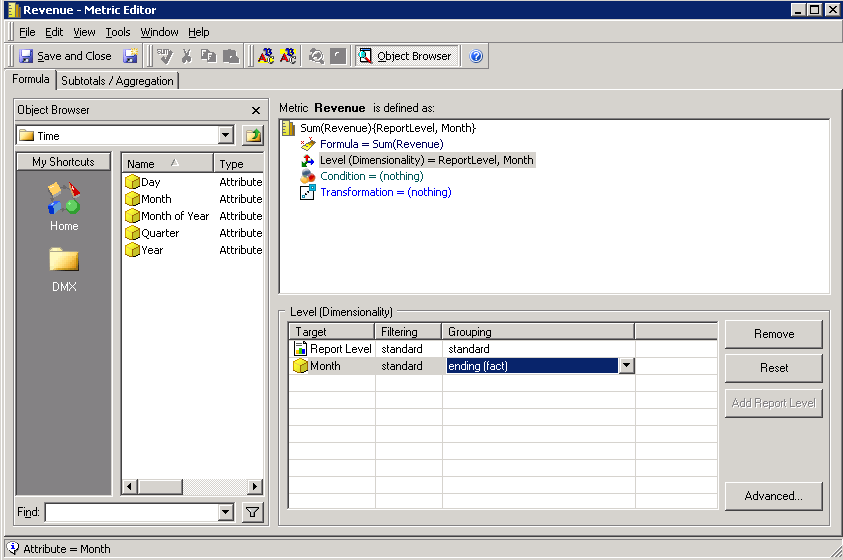
  1. Add Month attribute into level of revenue metric, set group function to be ending(fact), as below picture shown:
ka02R000000kWxYQAU_0EM440000002C6w.jpeg
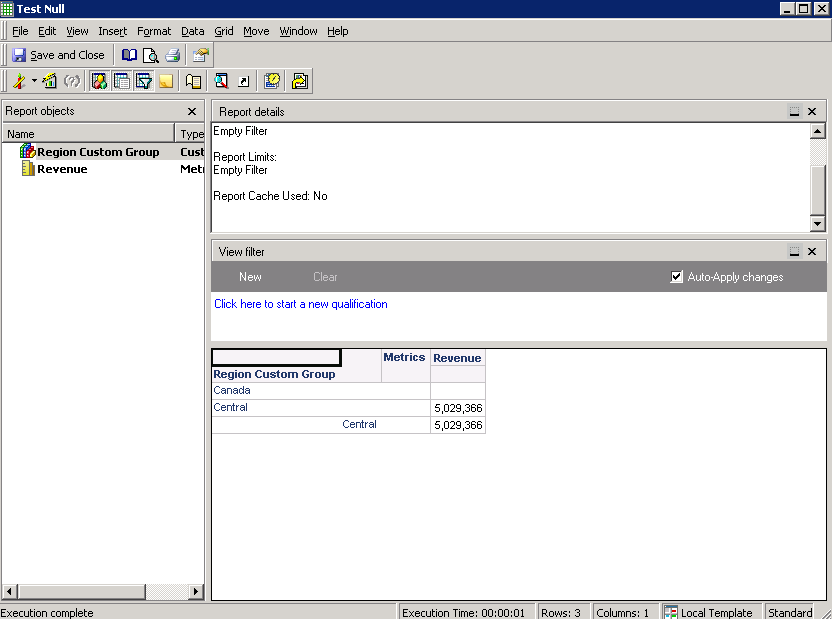
  1. Notice that Canada element can’t been shown anymore, as below picture shown:
ka02R000000kWxYQAU_0EM440000002C6z.jpeg

 
CAUSE:
The issue works by design. Check the SQL view below:


insert into ZZNB00
select  a11.[DAY_DATE] AS DAY_DATE,
        sum(iif(a12.[REGION_ID] in (11), a11.[TOT_DOLLAR_SALES], NULL)) AS WJXBFS1,max(iif(a12.[REGION_ID] in (11), 1, 0)) AS GODWFLAG1_1
from       [DAY_CTR_SLS]    a11, 
           [LU_CALL_CTR]    a12
where    a11.[CALL_CTR_ID] = a12.[CALL_CTR_ID]
and a12.[REGION_ID] in (11)
group by   a11.[DAY_DATE]

insert into ZZMB01 
select     max(pc11.[DAY_DATE]) AS WJXBFS1
from       [ZZNB00]              pc11
where    pc11.[GODWFLAG1_1] = 1

select     pa11.[WJXBFS1] AS WJXBFS1
from       [ZZNB00]              pa11, 
            [ZZMB01]             pa12
where    pa11.[DAY_DATE] = pa12.[WJXBFS1]
and       pa11.[GODWFLAG1_1] = 1


Ending(fact) function need SQL engine to find the last day in a fact table. Since there is no records regarding region Canada(ID 11) in fact table, both of temporary table ZZNB00 and ZZMB01 have no data. Finally the join result is a blank record.
 
ACTION:
If you really want to show custom group element in report, you can manually insert a null value sales record for that element in warehouse table.


Comment

0 comments

Details

Knowledge Article

Published:

April 13, 2017

Last Updated:

April 13, 2017