EducationSoftwareStrategy.com
StrategyCommunity

Knowledge Base

Product

Community

Knowledge Base

TopicsBrowse ArticlesDeveloper Zone

Product

Download SoftwareProduct DocumentationSecurity Hub

Education

Tutorial VideosSolution GalleryEducation courses

Community

GuidelinesGrandmastersEvents
x_social-icon_white.svglinkedin_social-icon_white.svg
Strategy logoCommunity

© Strategy Inc. All Rights Reserved.

LegalTerms of UsePrivacy Policy
  1. Home
  2. Topics

KB221972: Graphs as a selector have no option to "Show All" or clear the current selection in MicroStrategy Web


Community Admin

• Strategy


Graphs as a selector have no option to "Show All" or clear the current selection in MicroStrategy Web. Alternatively, if a user is in Grid View rather than Graph View, selecting the attribute name will update the target to show all of the attribute elements and effectively clear the current selection.

SYMPTOM:
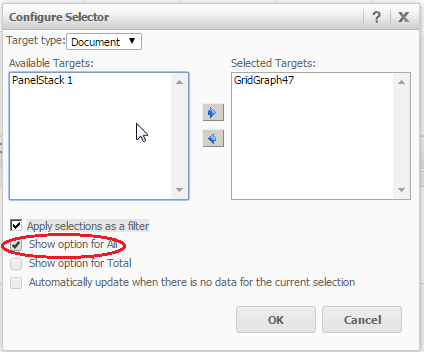
In Strategy Web, a user may want to use a graph as a selector for another object. When configuring the selector, users are given the opportunity to enable the “Show option for all” setting in the selector properties, as shown below:
ka04W000000Odh0QAC_0EM4400000025jc.jpeg

However, once a selection on the graph has been made, the user does not have the option to “Show All” or to clear the current selection. Alternatively, if a user is in Grid View rather than Graph View, selecting the attribute name will update the target to show all of the attribute elements and effectively clear the current selection.
 
STEPS TO REPRODUCE:
  • Create a simple bar graph in Strategy Web.
  • Create a grid with at least one attribute.
  • Use the graph created in Step 1 as a selector, targeting the newly created grid.
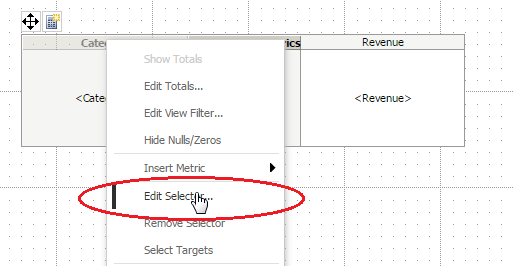
  • Right click on the graph and choose "Edit Selector".
ka04W000000Odh0QAC_0EM4400000025jb.jpeg
  • Enable the "Show option for All" setting.
ka04W000000Odh0QAC_0EM4400000025jc.jpeg
  • Run the document in any mode. 
  • Make a selection on the bar graph and notice the grid is updated accordingly.
  • Notice there is no option to clear the current selection or to show all of the elements. Instead, users will have to re-run the document in order to show all the elements.

 
CAUSE:
This is a known limitation with Strategy Web. A request has been logged to address this issue.
 
ACTION:
Strategy will continue to investigate and post updates as soon as they are available.


Comment

0 comments

Details

Knowledge Article

Published:

April 6, 2017

Last Updated:

April 6, 2017