SYMPTOM:
In Strategy Web 9.x and 10.x, reports that are exported to .csv file format can subsequently be opened using Microsoft Excel. In Excel, users may try to format individual cells or columns to show more decimal places. However, instead of seeing more decimal places, zeros are being displayed instead of the expected values.
Consider a scenario where in Strategy Web 9.x or 10.x, the metric values display only 2 decimal places. And the cell formatting has been changed in Excel to display 6 decimal places.
Export to Excel:
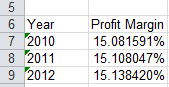
Notice the correct display of all 6 decimal places.
Export to cvs:
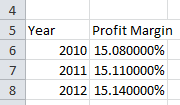
Notice all additional decimal values are replaced with zeros.
STEPS TO REPRODUCE
CAUSE:
This is working as designed in Strategy Web 9.x and 10.x. When exporting to .csv from Strategy Web, the Export engine in the Strategy Intelligence Server will take the formatting of the report into consideration, meaning that whatever appears visually in Strategy Web is exactly what will be exported and nothing else. In the example above, there were 2 decimal places displayed in Strategy Web, thus only those two decimal places are exported by the Export engine. This is why attempting to include further decimal places does not add any values and Excel places zeros to compensate.
This differs from the Export to Excel option. Exporting to a .xls or .xlsx file format from Strategy Web will make the Export engine in the Strategy Intelligence Server export the raw data. The data coming from the warehouse will be exported in as much detail as possible, and all of this information will be available for use in manipulating the data further in Excel. The cell is then formatted with the same format it had in Strategy Web to display only two decimals. However, if the user changes that to display more decimals, the data will be available and Excel will display them correctly.
ACTION:
If the user requires the ability to increase data accuracy after exporting, export to Excel instead of csv.
The Strategy Internal Reference Number for the issue discussed in this technical note is 1002087.
