EducationSoftwareStrategy.com
StrategyCommunity

Knowledge Base

Product

Community

Knowledge Base

TopicsBrowse ArticlesDeveloper Zone

Product

Download SoftwareProduct DocumentationSecurity Hub

Education

Tutorial VideosSolution GalleryEducation courses

Community

GuidelinesGrandmastersEvents
x_social-icon_white.svglinkedin_social-icon_white.svg
Strategy logoCommunity

© Strategy Inc. All Rights Reserved.

LegalTerms of UsePrivacy Policy
  1. Home
  2. Topics

KB221996: A Microchart widget will fail to sort a metric that contains positive, negative, and null values in MicroStrategy Web 9.4.1 and above.


Community Admin

• Strategy


A Microchart widget will fail to sort a metric that contains positive, negative, and null values in MicroStrategy Web 9.4.1 and above.

SYMPTOM
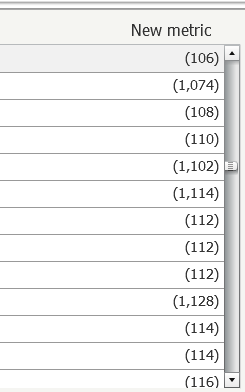
Users have the ability to sort on a metric in the Microchart widget in Strategy Web 9.4.1.  If this metric contains values that are positive, negative, and null, then the sorting applied will be incorrect.  Refer to the two images below.  The first image shows the metric column prior to sorting, and the second image shows the same metric column after it has been sorted.  Notice that the values in the second image are not in any discernible order.

ka04W000000OePjQAK_0EM4400000025jW.jpeg


ka04W000000OePjQAK_0EM4400000025jS.jpeg

 
STEPS TO REPRODUCE

  1. Create a dataset with the Customer and Month attributes on the rows and the Revenue metric on the column.
  2. Add a derived metric calculated based on Revenue with the following formula:
    
    CaseV(Mod(Revenue, 2), 0, (-1 * Revenue), 1, ZeroToNull(0), Revenue)

    This formula is used in order to produce three types of values – negative, positive and NULL values.
  3. Add a filter on the Customer attribute to reduce the number of rows.
  4. Create a document based on the dataset created on step 1.
  5. Put a grid on the document and place Customer and Month on the rows and Revenue and the derived metric on the columns.
  6. Enable the Microchart widget on the grid and turn off all chart modes except for Sparkline. Verify that the derived metric is displayed on the grid and contains positive, negative and NULL values.
  7. Try to sort the derived metric column and see that it is not sorted properly.

 
CAUSE
This is a known issue in Strategy Web 9.4.1 and above.
 
ACTION
This issue was reviewed by our Technology team for feasibility and will not be scoped for a code fix in any upcoming Strategy release. As seen in article KB257502: New in MicroStrategy 10.1 - Interactive and Flash document view modes deprecated it is recommended creating documents for Presentation mode with the new widgets in HTML.


Comment

0 comments

Details

Knowledge Article

Published:

June 9, 2017

Last Updated:

June 9, 2017