SYMPTOM:
Conditional Formatting for derived metric does not work correctly in Report Service Document in Flash mode in Strategy Web 9.4.1.
STEPS TO REPRODUCE:
Follow the steps below to reproduce the issue with Strategy Tutorial project:
1. Create a report with Month, Revenue and Cost.
2. Create a derived metric in the report as below.
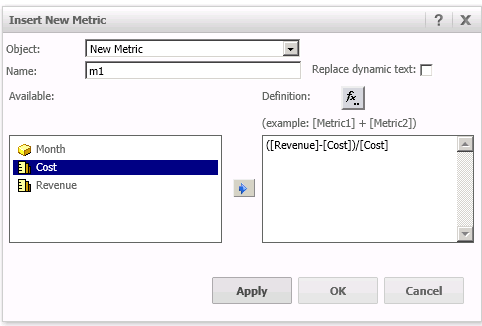
3. Create a Report Service Document based on the above report. Add the dynamic text of the derived metric, a textbox "text1", and some other objects in the document.
4. Configure Conditional Formatting for the textbox as below.
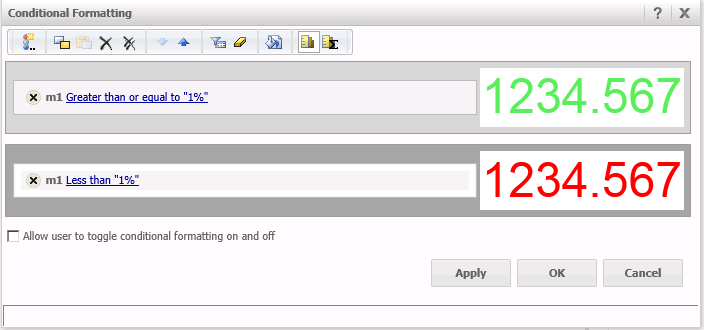
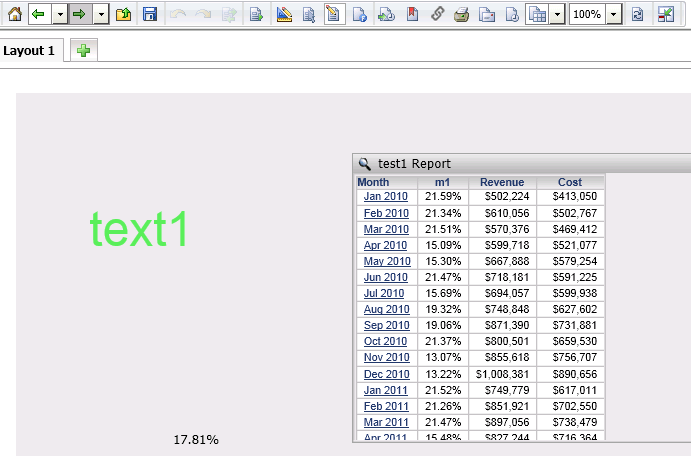
5. Run the Report Service Document in DHTML mode. Note that the textbox is correctly displayed in green.
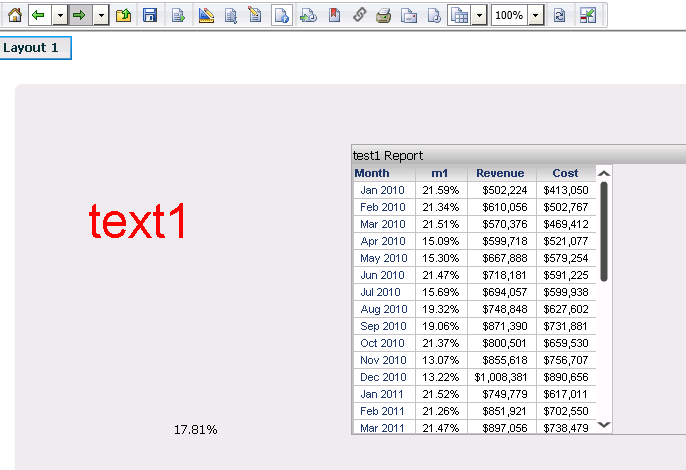
6. Run the Report Service Document in Flash mode. Note that the textbox is displayed in red.
CAUSE:
This is a known issue in Strategy Web 9.4.1.
ACTION:
Currently this issue is still being reviewed for feasibility by our Technology team and it is not scoped for any upcoming scheduled Strategy release
The Strategy Internal Reference Number for the issue discussed in this technical note is 1002560.
