EducationSoftwareStrategy.com
StrategyCommunity

Knowledge Base

Product

Community

Knowledge Base

TopicsBrowse ArticlesDeveloper Zone

Product

Download SoftwareProduct DocumentationSecurity Hub

Education

Tutorial VideosSolution GalleryEducation courses

Community

GuidelinesGrandmastersEvents
x_social-icon_white.svglinkedin_social-icon_white.svg
Strategy logoCommunity

© Strategy Inc. All Rights Reserved.

LegalTerms of UsePrivacy Policy
  1. Home
  2. Topics

KB22235: The Alerts editor gives users the option to choose a delimiter type even when the only available delivery type has been set as HTML in a Report in MicroStrategy Web 9.x and 10.x


Community Admin

• Strategy


This article describes, when creating an E-mail notification through the Alerts Editor on a report in MicroStrategy Web 9.x and 10.x , the user is permitted to choose certain delivery settings

SYMPTOM
When creating an E-mail notification through the Alerts Editor on a report in Strategy Web 9.x and 10.x , the user is permitted to choose certain delivery settings. Two of these delivery settings are Delivery format and Delimiter. If the user has the ability to choose between various delivery formats, they should also be able to choose the delimiter to be used in the particular deliver format of their choice.
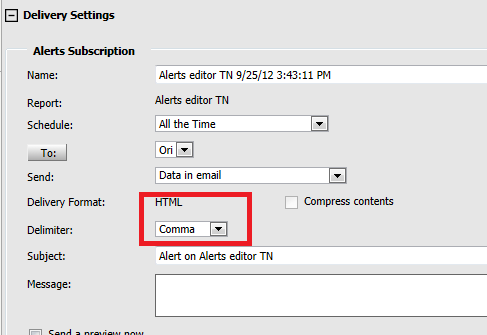
When the Administrator has set the only available export format like HTML, the expectation is that the user should not have the ability to choose the delimiter, because HTML delimiters are predefined. However, the delimiter option is still presented to the user in the Alerts Editor interface.
 
STEPS TO REPRODUCE
Follow these steps in Strategy Tutorial to reproduce:
  • Create a report in Strategy Web with an attribute in the rows and a metric in the columns.
  • Run the report.
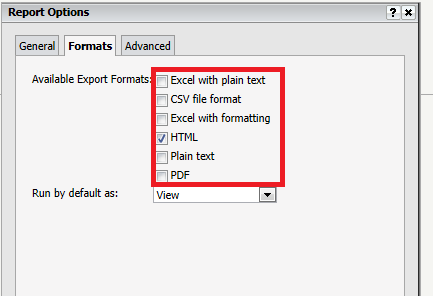
  • Go to Tools > Report Options > Formats, and make 'HTML' the only format checked under 'Available Export Formats' as shows below:
     
ka04W000000OahMQAS_0EM440000002HNr.png
  • Right-click the metric column, navigate to alerts, and click on 'Email notification.' The Alerts Editor will appear.
  • In the Alerts Editor, click on Delivery Settings.
  • Notice that HTML is the only delivery format available but that there is an option to choose from various delimiters as shown below:
     
ka04W000000OahMQAS_0EM440000002HNo.png

 
CAUSE
This is a known issue in Strategy Web 9.x and 10.x.
 
ACTION
Strategy will continue to investigate and post updates as soon as they are available.
 
KB22235


Comment

0 comments

Details

Knowledge Article

Published:

May 26, 2017

Last Updated:

December 4, 2018