EducationSoftwareStrategy.com
StrategyCommunity

Knowledge Base

Product

Community

Knowledge Base

TopicsBrowse ArticlesDeveloper Zone

Product

Download SoftwareProduct DocumentationSecurity Hub

Education

Tutorial VideosSolution GalleryEducation courses

Community

GuidelinesGrandmastersEvents
x_social-icon_white.svglinkedin_social-icon_white.svg
Strategy logoCommunity

© Strategy Inc. All Rights Reserved.

LegalTerms of UsePrivacy Policy
  1. Home
  2. Topics

KB222368 : If grid headers' fill color is set to no fill and the row or column headers are locked, the headers default to a white fill color in MicroStrategy Web 9.4.1


Community Admin

• Strategy


If grid headers' fill color is set to no fill and the row or column headers are locked, the headers default to a white fill color in MicroStrategy Web 9.4.1

SYMPTOM:
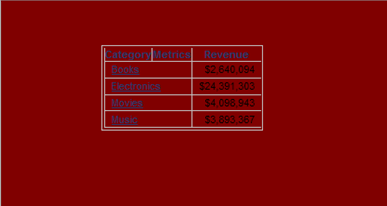
In Strategy Web 9.4.1 document, a user can set grid headers in a report to have no fill, such that they take the background color of the document, as seen below:
ka04W000000OhFmQAK_0EM4400000025oN.jpeg

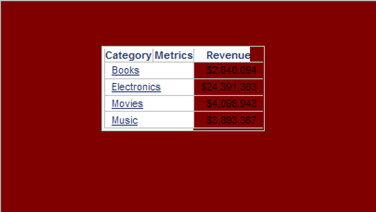
However, in DHTML view modes (Express, Interactive, and Editable), if the row or column headers are locked, the fill color of the headers reverts to a default white, preventing it from taking the background color, as seen below:
ka04W000000OhFmQAK_0EM4400000025oS.jpeg

 
CAUSE:
This is a known issue with Strategy Web 9.4.1. White is used as the default background color for a locked header mask, when it should be obtaining the background color for the grid's parent element.
 
ACTION:
The fix for this issue is currently pending development for inclusion in a future release of Strategy.


Comment

0 comments

Details

Knowledge Article

Published:

May 29, 2017

Last Updated:

May 29, 2017