SUMMARY
This document outlines an issue seen with application of view filters based on derived metrics when the derived metrics are not on the template. This issue has been classified as a defect with Strategy 9.3.x - 9.4.x.
SYMPTOM
In Strategy 9.x, derived metric shows incorrect value when it is in report object window; derived metric shows correct result when it is on template.
STEPS TO REPRODUCE
The following steps are based on the Strategy Tutorial project:
1. Create metric called M1 with the formula of “Sum([M1]) {~}”; create another metric called M2 with the formula of “Sum([M2]) {~}”; [M1] and [M2] are facts that contains Null values.
2. Create a report with attribute “1” and metrics M1 and M2; attribute “1” contains sequential numbers for its data.
3. Create a derived metric called DM with the formula of “(Abs([M1]) + Abs([M2]))”
4. Make sure VLDB property “Null checking for Analytical Engine" is set to true.
5. Execute the report, notice the result is correct as shown below; DM doesn’t have any Null value.
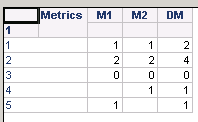
6. Add a view filer based on the derived metric set it to “DM is Null” and remove the derived metric from grid.
Notice that the report returns two rows of data which indicates DM has some Null values. When M1 is null, and M2 is 1, the DM value should be 1; and when M1 is 1, and M2 is Null, the DM value should be 1 too.
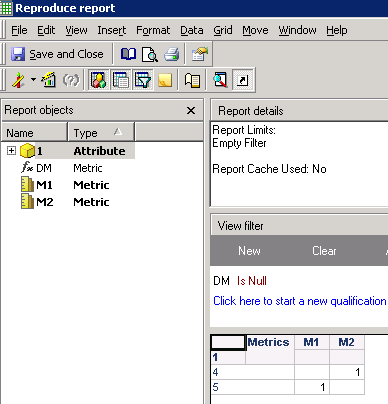
7. Add the derived metric back to report template can generates correct result; no data returns.

CAUSE
This is a known issue with Strategy 9.3.x - 9.4.x.
ACTION
Contact Strategy Technical Support for an update on the status of the issue. Currently this issue is still being reviewed for feasibility by our Technology team and it is not scoped for any upcoming scheduled Strategy release.
The Strategy Internal Reference Number for the issue discussed in this technical note is 764229.
