EducationSoftwareStrategy.com
StrategyCommunity

Knowledge Base

Product

Community

Knowledge Base

TopicsBrowse ArticlesDeveloper Zone

Product

Download SoftwareProduct DocumentationSecurity Hub

Education

Tutorial VideosSolution GalleryEducation courses

Community

GuidelinesGrandmastersEvents
x_social-icon_white.svglinkedin_social-icon_white.svg
Strategy logoCommunity

© Strategy Inc. All Rights Reserved.

LegalTerms of UsePrivacy Policy
  1. Home
  2. Topics

KB222608: In a clustered environment in MicroStrategy 9.x, updating an Intelligent Cube returns "Cube Manager: number of cubes has exceeded maximum N for project" error.


Community Admin

• Strategy


In a clustered environment in MicroStrategy 9.x, updating an Intelligent Cube returns "Cube Manager: number of cubes has exceeded maximum N for project" error.

SYMPTOM:
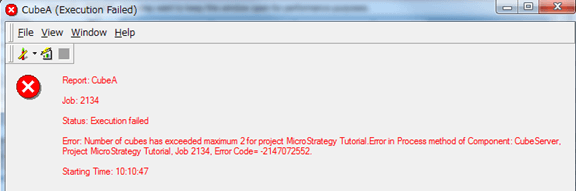
Updating an Intelligent Cube returns an error even if the number of cubes seems not to be exceeding the stated value:
ka04W000000Of4DQAS_0EM4400000029IB.jpeg

 
Error: Number of cubes has exceeded maximum 2 for project Strategy Tutorial.
Error in Process method of Component: CubeServer, Project Strategy Tutorial, Job xxxx, Error Code= -2147072552.
 
STEPS TO REPRODUCE:
Follow the steps below to reproduce the issue:
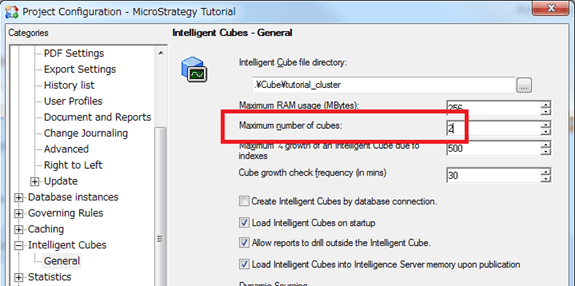
  • Under a clustered Intelligence Server environment, set the “Maximum number of cubes” to "2" in the Project Configuration, and restart Intelligence Servers for this change to take effect:
ka04W000000Of4DQAS_0EM4400000029IC.jpeg
  • Create 2 Intelligent Cubes.
    - CubeA
    - CubeB
  • In Intelligence Server NodeA, execute CubeA
  • In Intelligence Server NodeB, execute CubeB
  • In Intelligence Server NodeA, try updating CubeB. The error is displayed.

The update of the cubes from the local nodes succeeds without any error.
 
CAUSE:
Under a clustered environment, this is an expected behavior. When updating remote Intelligent Cube information, it tries to publish the Intelligent Cube locally, and sends a cluster broadcast message to delete Intelligent Cubes. So this publication process requires additional “Maximum number of cubes”.
 
ACTION:
There are possible options to avoid this error.

  • Update the Intelligent Cubes from the local node, where the actual file resides
  • Remove the Intelligent Cube caches before updating
  • Increase the “Maximum number of cubes” in the Project Configuration

 
Furthermore, there is an enhancement request to modify this behavior to remove the cache before execution regardless of the cache file location. Strategy will continue to investigate and post updates as soon as they are available.


Comment

0 comments

Details

Knowledge Article

Published:

June 9, 2017

Last Updated:

June 9, 2017