EducationSoftwareStrategy.com
StrategyCommunity

Knowledge Base

Product

Community

Knowledge Base

TopicsBrowse ArticlesDeveloper Zone

Product

Download SoftwareProduct DocumentationSecurity Hub

Education

Tutorial VideosSolution GalleryEducation courses

Community

GuidelinesGrandmastersEvents
x_social-icon_white.svglinkedin_social-icon_white.svg
Strategy logoCommunity

© Strategy Inc. All Rights Reserved.

LegalTerms of UsePrivacy Policy
  1. Home
  2. Topics

KB222886: "Object with ID 'D3C7D461F69C4610AA6BAA5EF51F4125' and type 8 (Folder) is not found in the metadata." error returned when trying to log into MicroStrategy Mobile 9.4.x when using the default home screen.


Community Admin

• Strategy


This technical note outlines an issue users may experience when trying to access MicroStrategy Mobile due to missing objects. This occurs when using the default home screen in Mobile.

SUMMARY

This technical note outlines an issue users may experience when trying to access Strategy Mobile due to missing objects. This occurs when using the default home screen in Mobile.
 

SYMPTOMS

When trying to log into Strategy Mobile 9.4.x application, and the configuration is defined to use the default home screen, users may encounter the following error:
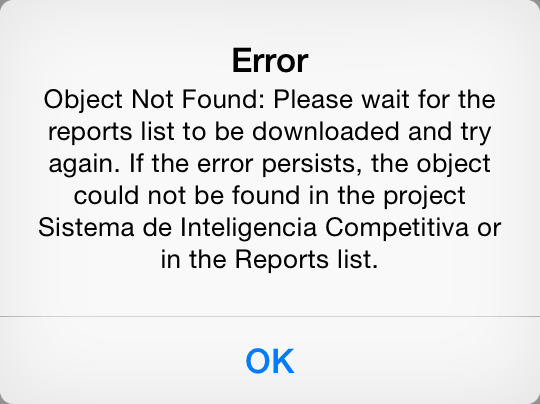
ka04W000000OfnrQAC_0EM440000002A0X.jpeg

 
In the device logs, users may see the following:


[Jan 6, 2015, 2:50:38.882 PM] [Severe] [MSITaskRequest.handleResponse] [34] [com.Strategy.web.beans.WebBeanException: (Object with ID 'D3C7D461F69C4610AA6BAA5EF51F4125' and type 8 (Folder) is not found in the metadata. It may have been deleted.)(-2147216373)]


CAUSE

For that specific object ID (D3C7D461F69C4610AA6BAA5EF51F4125), the out-of-the-box Public Objects\Reports folder does not exist in the project. This could be due to one of two causes:

  1. The folder was accidentally deleted in the project.
  2. The System Objects ID Unification  test did not properly go through for the project. Review KB37707 for more information on this issue.


ACTION

If the Public Objects\Reports folder exists in the project and the GUID of the Public Objects\Reports folder is not D3C7D461F69C4610AA6BAA5EF51F4125, contact Strategy Technical Support on this issue.
 

WORKAROUND

To work around this issue, one of two things can be done:
1. Create a new project in the metadata and migrate the entire contents of the old project into the new project.
2. Use a custom home screen that points to another folder available in your project.


Comment

0 comments

Details

Knowledge Article

Published:

April 12, 2017

Last Updated:

July 21, 2017