Metadata Doctor (MD Doctor) is a utility that detects and fixes certain physical inconsistencies in Strategy 9.4.x - 9.5.x metadatas that may prevent Strategy 9.4.x - 9.5.x products from functioning correctly.
In simple terms, it detects physical inconsistencies by running SQL against different metadata tables and then comparing results. If an entry is found in one table but not in the main lookup table of the metadata then that denotes a physical inconsistency and MD Doctor will delete that orphan entry.
Note: MD Doctor is not a supported tool for Strategy 10.x metadatas. Contact Strategy Technical Support to report issues which you believe might be fixed via MD Doctor.
NOTE: MD Doctor should be used only after a metadata backup has been taken. MD Doctor should not be used repeatedly. It is meant to primarily serve as a quick-fix to physical inconsistencies and get environments up and running. If repeated use of MD Doctor is needed then a possible recurrent-metadata physical inconsistency is being encountered. Contact Strategy Technical Support to report repeated use of MD Doctor against a metadata and attempt to find the root cause of the problem.
MD Doctor v6
To obtain details on the checks performed by MD Doctor review: KB8529: "What checks are performed by MD Doctor and how should the results be interpreted?"
MD Doctor Best Practices
Remember the following Best Practices when running MD Doctor:
Pre-Requisites:
The following are pre-requisites for the use of MD Doctor:
Certified DBMS Configurations:
MD Doctor has been certified for the following database platforms:
IBM DB2 UDB 9.7 for Linux, Windows and Unix
IBM Informix Dynamic Server 11.7
PostgreSQL 9.1
PostgreSQL 9.2
MySQL Enterprise 5.5
Sybase Adaptive Server Enterprise 15.5
Sybase Adaptive Server Enterprise 15.7
Microsoft SQL Server 2005
Microsoft SQL Server 2008
Microsoft SQL Server 2012
Oracle 10g Release 2
Oracle 11g Release 2
Teradata 13.1
Teradata 14.0
Microsoft Access 2003
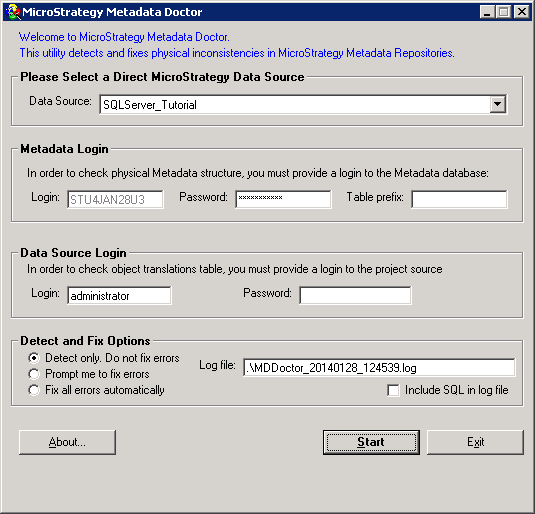
Using Metadata Doctor:

WARNING:
Manually editing values in the Strategy Metadata incorrectly may cause serious, project-wide problems that may make your project unusable. Since these are user-initiated changes, they are not covered by any Strategy warranty. Users are strongly encouraged to backup the metadata prior to any alteration.
This issue has been logged as KB ID: 13727
